How To Make Your Own Roblox Pants

In the sprawling digital metropolis of Roblox, where over 70 million daily users log in to build, play, and socialize, the humble pair of pants is more than just a polygon mesh wrapped around an avatar’s pixelated legs. It is a statement of identity, a badge of status, and, for a growing subculture of digital fashionistas, a canvas for entrepreneurial ambition. While most players spend their Robux on off-the-shelf attire from the Avatar Shop, a savvy—and increasingly creative—minority are diving into the forgotten art of DIY apparel, specifically the custom pants template. This isn’t just about avoiding a $5 purchase; it’s about the visceral thrill of creation, the ability to wear a piece of your own digital soul, and the quiet rebellion against the algorithmic sameness of modern virtual fast fashion.
The history of Roblox pants is a weird, blocky saga. In the early days of 2006, pants were literal geometric tubes, utterly devoid of texture. But by 2008, the introduction of the classic two-leg template—a single image file with a specific layout for the front, back, and inner seams—ushered in an era of pixelated self-expression. Fast forward to today, and the template has barely changed, yet the tools around it have exploded. You can now use external software like GIMP or Photoshop to create everything from realistic ripped jeans to shimmering, glowing cyber-pants. But here’s the kicker: the platform’s policies have shifted. While you used to be able to upload clothing for free, Roblox now charges a premium (often a painful 10 Robux) for uploading a mesh or classic clothing item, making the DIY route a calculated risk. Yet, the community persists. Why? Because the moment you see your creation walking down the chaotic streets of Brookhaven, you feel a god-like power that no off-the-shelf item can replicate. It is the digital equivalent of wearing a bespoke Savile Row suit in a sea of fast-fashion zombies.
The Underground Psychology of Digital Sartorialism
Why obsess over 64x64 pixel textures? The answer lies deep in the psychology of self-representation. In the physical world, our clothing is a social signal—a silent language of status, subculture, and mood. In Roblox, this signal is amplified tenfold because the avatar is a fully mutable construct. A player with custom-made pants isn’t just showing off wealth; they are demonstrating a specific type of cultural capital—the knowledge of a technical skill that most others lack. It’s the difference between buying a print from a gallery and painting the canvas yourself. That subtle arrogance, the quiet nod to fellow creators when you spot a flawless shading job on the inner leg seam, creates an invisible freemasonry of designers.
Must Read
Furthermore, the act of making pants is a masterclass in constrained creativity. The template is unforgiving. You have to mentally unwrap a 3D cylinder, correctly mapping the front and back of the thighs, the crotch seam, and the often-forgotten side panels. Get the symmetry wrong, and your avatar looks like it has one leg dipped in a vat of radioactive slime. This difficulty, however, paradoxically fuels addiction. The dopamine rush of finally aligning the pixels correctly after an hour of zooming in and out is a neurological reward that micro-transactions can never match. You are battling the mesh, and when you win, you wear the trophy.
There is also a darker, funnier undercurrent to this craft. Many veteran creators start with "troll pants"—hideous mismatched color schemes or absurd patterns designed to break the visual flow of a server. It is a form of digital graffiti. And with the rise of "classic" pasta-looking accessories, the old pants template has become a nostalgic relic, a hipster badge in a world obsessed with hyper-realistic 3D layers. Making your own pants is a deliberate choice to engage with the platform’s history, a thumbing of the nose at the sleek, soulless "layered clothing" that Roblox is aggressively pushing. It’s the virtual equivalent of a kid in the 90s wearing vinyl records as belts—awkward, but full of intent.
From Pixels to Profit: A Step-by-Step Philosophy
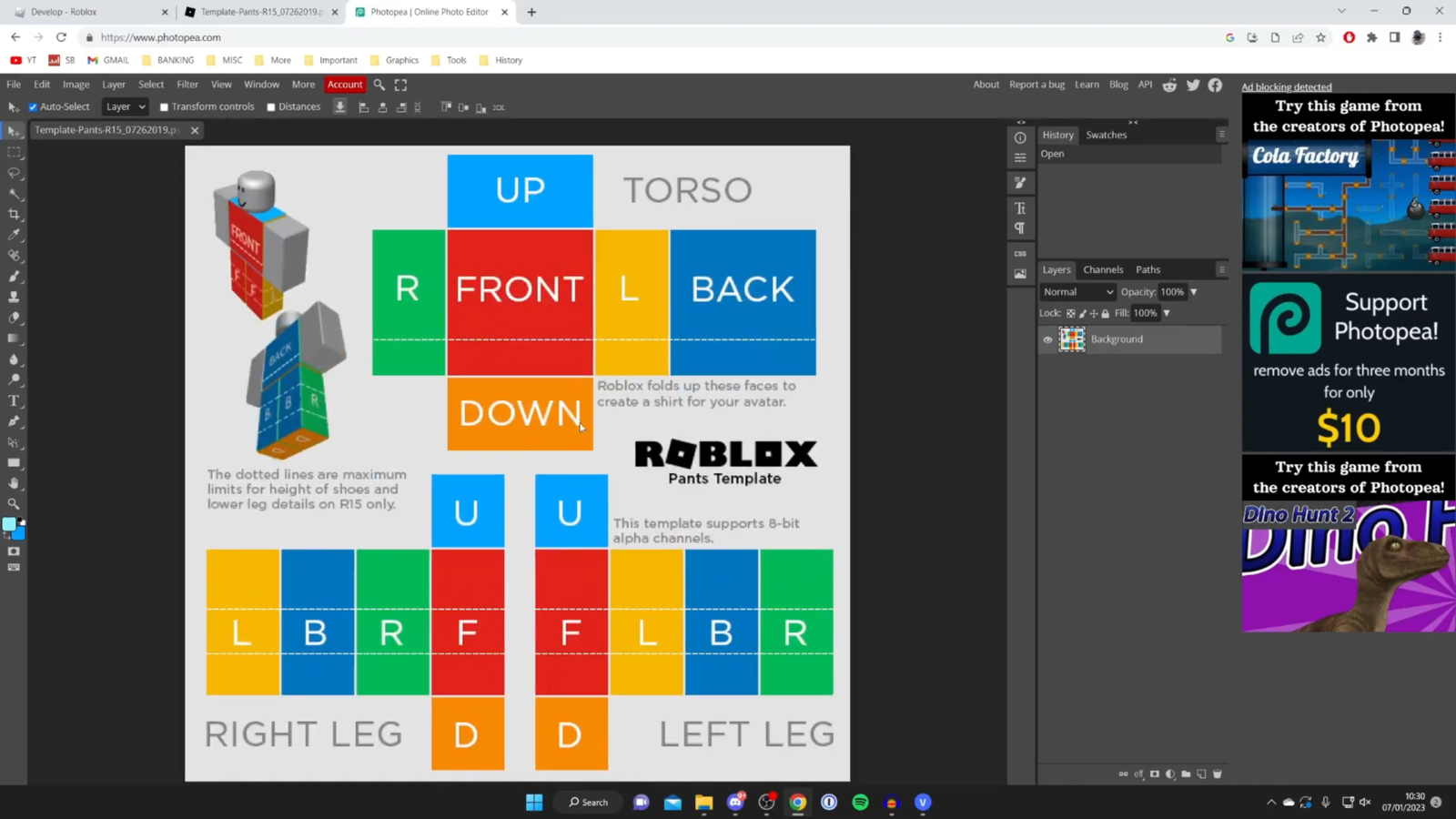
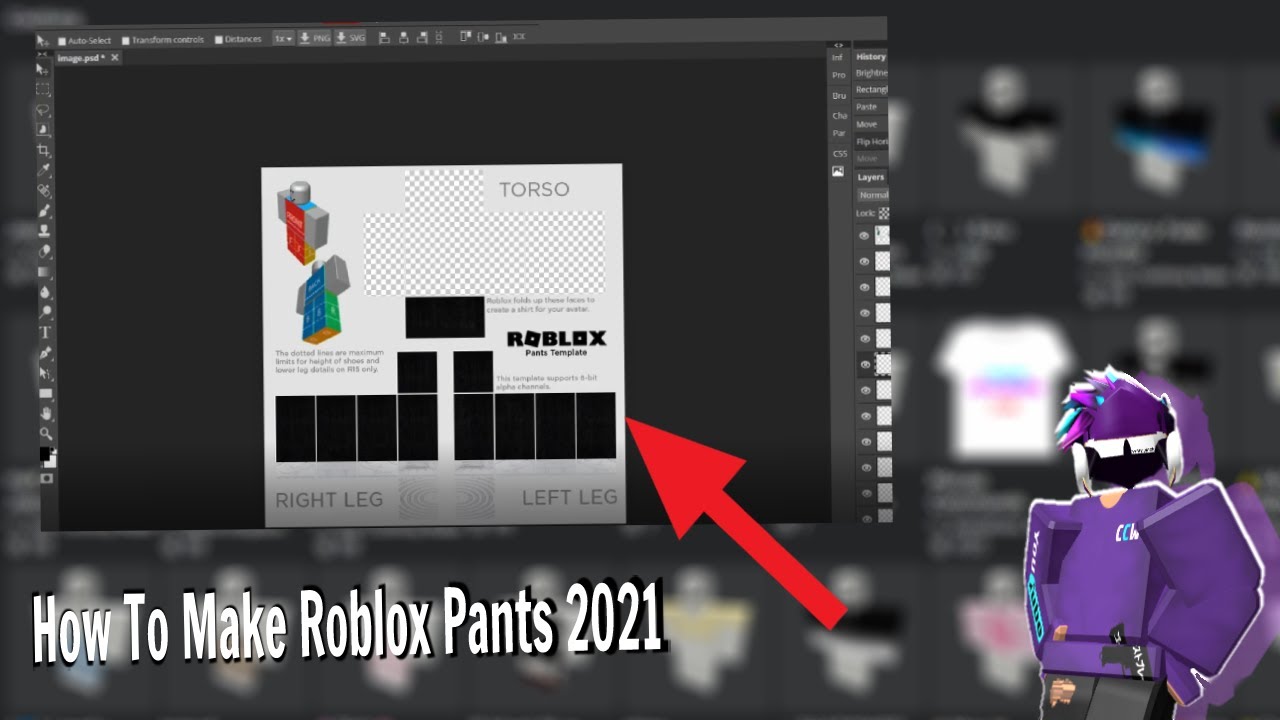
Let’s get practical. Before you open your editor, you need to acquire the correct template. Do not, under any circumstances, try to draw pants from memory on a blank canvas. This is the rookie mistake that leads to digital leg-horrors. Head to the Roblox Developer Hub and search for the "Classic Pants" template. Save the PNG file. This file is your holy scroll. Study it. Notice that the legs are not just two straight columns; they have a specific curve at the top to accommodate the hips, and there is a distinct "inner leg" section that is often ignored by beginners. Treat this template as a sacred geometry puzzle, not a plain surface.

Now, open your software—GIMP is your best friend because it’s free, powerful, and runs on anything. For the sake of your sanity, set your grid to 64x64 pixels (the standard size for classic items) to see the individual pixel blocks clearly. Start with a base layer of solid color. Let’s say you want dark-wash jeans. Fill the legs with a deep indigo. Here is where the dark magic happens: shading. On a new layer, use a soft brush with low opacity to paint a subtle white glow on the front thighs (the position of a light source from above) and a deep black shadow on the inner seams and behind the knees. This is called "cel shading" in the community, and it’s what separates your pants from a flat blue void. Zoom in. Add a zipper line, a stitch pattern using a 1-pixel brush, or even a tiny pocket crease. Details at 64x64 are about suggestion, not realism—a single pixel of white can represent a glowing neon stripe if placed correctly.
Here is a scenario to illustrate the process: imagine you are making cyberpunk cargo pants. Instead of standard pockets, you decide to add glowing cyan lines along the outer leg. On your template, the outer leg is the far-left and far-right edges of the leg columns. You need to map this. If you draw the line on the front view, it will appear in the middle of the leg. You must draw it on the side margin. This is the "wrap-around" illusion. Test this by uploading a temporary version (costing you 10 Robux) or using the "Preview" function within the Roblox Studio. When you upload, you will be asked to choose "Pants" and then you will see an option for "Classic" or "Layered." Choose Classic. If the design wraps correctly, you feel a surge of victory. If not, you will spend another hour adjusting a single pixel column. This iteration is where the true value lies; it teaches you spatial reasoning, patience, and the art of digital forgery (of clothing, anyway).
Finally, consider the economics. Uploading a single pair costs 10 Robux (roughly $0.125). This serves as a gatekeeper. It prevents the platform from being flooded with absolute garbage. But it also means that for a handful of Robux, you can create a limited edition set of pants for your friends. If you become skilled, you can set the price to say, 100 Robux, and sell them. The key here is niche aesthetics. Don't try to design basic black pants; the market is flooded. Create hyper-specific items—"Y2K acid-wash flares for a group of friends," or "holographic pants that match a specific mesh face." This is how you build a cult following. I know a creator who made $50,000 Robux just by making pants that look like different brands of cereal boxes. It’s absurd, but it’s real. The actionable takeaway is this: start with a copy of an existing design to learn the mapping, then deconstruct it. Study the shadows of popular items, and then obsess over your unique piece.
Five FAQs from the Digital Fitting Room
1. Why are my upscaled textures blurry in-game even though I drew them perfectly?
This is the classic trap of the resolution mismatch. The Roblox engine does not use a nearest-neighbor scaling algorithm by default. It is usually set to automatic filtering (or "smooth" texture filtering). This means that when the game zooms in on your avatar, the engine physically interpolates the pixels, blending them together to create a smoother, but blurrier, image. To combat this, you have to be aggressive with your contrast. You cannot rely on subtle, 2-pixel gradients. You need to define edges with stark color changes. Think comic book art, not watercolor. If you want crisp lines, ensure the color difference between adjacent areas is at least 20-30 RGB points, otherwise the engine will mesh them into a muddy gray.

Furthermore, you must consider the compression algorithm used by the asset server. PNGs are fine, but if you save as a JPEG (which some image hosts force you to export), the artifacts will destroy your fine lines. Always export as a PNG with a transparency layer (even if you don't use transparency). The second part of this issue is viewing distance. In-game, pants are small. A 1-pixel detail on a 64x64 canvas translates to less than a hairline on your screen. Therefore, your design must be readable from a "thumbnail" perspective. Bold stripes, blocky patches, and massive color blocks work best. You aren't creating a detailed painting; you are creating a logo for a moving, spinning object.
2. Is it legal to make pants that look like real brands (e.g., Nike, Gucci)?
The short answer is a resounding, terrifying, NO. Roblox has a strict IP (Intellectual Property) policy, enforced by an automated takedown system called the DMCA (Digital Millennium Copyright Act). If you use a recognizable Nike swoosh, even if it’re pixilated or rotated, the brand's lawyers can file a takedown request. Roblox will then delete your item, and if you have made Robux from it, they will ban your account and hold the funds. In 2021, there were rampant bans of users creating "fashion" items with luxury logos. The legal precedent is clear: you are profiting from trademark infringement.
However, there is a gray area known as parody or homage. You can create a red and black checkered pattern that evokes Burberry without using the exact Nova Check. You can make a "swoosh" that is actually a sideways lightning bolt. The community is rife with these satirical knockoffs. The trick is to use the general aesthetic language—color palettes, layout, silhouette—without copying the specific trademarked logo. This is a legal tightrope. If you can clearly change the shape so it's not visually identical, you are likely safe. But if a lawyer with a magnifying glass can say "that’s a Louis Vuitton Monogram," you are done. Stick to original patterns inspired by streetwear vibes, not direct copies.
3. Why do my pants look like they have a giant bulge or weird shadow at the crotch?
Ah, the infamous "crotch shadow." This is caused by a fundamental misunderstanding of the template’s anatomy. The template has a specific section for the waist/crotch area that is essentially a triangle that folds between the legs. If you apply a dark gradient there, it physically resembles a 3D indentation, which on a flat blocky avatar looks like an anatomical ambiguity that both looks strange and is ironically comedic. To fix this, you must treat the crotch as a flat seam, not a valley. Your shading should not curve downwards; it should be a straight vertical line connecting the top of the legs.
In the world of 3D modeling, this is called "standard normal mapping" approximation—you are faking the lighting. But because the avatar is blocky, the actual geometry provides its own sharp angles. The worst look is adding a dark oval in the center of the template. In-game, this oval becomes a shadow that sits on the mesh, making it look like the avatar has a dark, mysterious void between its legs. Instead, use a lighter tone on the inner thighs and only a thin, 1-pixel line to show the seam where the legs connect to the torso. Study the default "Roblox Denim" pants that came with the early avatars—they use a nearly flat color there. Keep it simple; clarity prevents comedy.
4. Can I animate or make my pants have moving parts?
No, not with the classic pants template. Classic clothing is a static texture applied to a rigid mesh. The mesh only deforms at the joints (hips, knees), but the texture itself stretches and squashes. You cannot have a glowing neon stripe that moves independently, or a gif-style animation of flames. That functionality is strictly reserved for "Layered Clothing" (which uses full 3D meshes) and even then, animation is limited to simulated physics (like a cape trailing). For classic pants, you are bound to a static image.
However, you can create the illusion of motion. By utilizing a technique called "offset design," you can draw a pattern that repeatedly loops. For example, if you draw a stripe that wraps around the leg diagonally, the brain perceives this as "movement" potential even when static. You can also create a "glitch" effect by placing random horizontal bands of static noise across the leg. This tricks the eye into thinking the texture is a broken hologram. But fundamentally, you cannot have a pixel walk up the leg. The only movement is the leg itself. So, design for the split-second pose your avatar will be in during a dance or a run, not for constant movement.
![How To Make Pants On Roblox [ Easy & First ] - YouTube](https://i.ytimg.com/vi/zcjQO2KflLI/maxresdefault.jpg)
5. Why can't I just use a photo of fabric and paste it on the template?
Oh, you can. And 90% of beginners do. The result is an abomination. When you paste a high-resolution photo of, say, carpet or denim cloth onto the 64x64 canvas, the resampling process creates a phenomenon called moire patterns—those weird, swirly, rainbow-like distortions. Because the photo contains millions of colors and fine details, the engine compresses and downsizes it, resulting in visual static. It looks less like fabric and more like a corrupted VHS tape.
Moreover, photo textures lack the necessary "flatness" for the Roblox lighting engine. Photographs contain light gradients from the original photo's flash. When applied to the avatar, these gradients conflict with the real-time lighting of the game world. Your pants might glow in the dark on one side and be pitch black on the other. The solution is to manually draw the texture using block colors and purposefully placed shadows. This is called "stylized art." You are not copying reality; you are interpreting it into a low-resolution pixel language. If you must use a photo, you need to first reduce it to 64x64, then posterize it (reduce the number of colors to less than 16), and then manually erase the noise. It’s more work, but it yields a clean vector-like look. Trust the process; pixels are your paint, not your camera.
Ultimately, the art of DIY Roblox pants is a microcosm of our broader human desire for agency. In a world where we are constantly consuming digital content curated by algorithms, creating our own avatar’s clothing is a small but potent act of defiance. It reminds us that we are not just passive consumers of the digital realm, but active builders. The frustration of a misplaced pixel, the satisfaction of a perfectly aligned seam—these are tangible feelings in an increasingly intangible world. This craft forces us to slow down, to pay attention to a 64x64 grid, and to find beauty in restriction. It is a meditation on the fact that creativity rarely comes from unlimited freedom, but from elegant constraints.
When you see a random stranger on the street wearing your pants—those neon pink and green monstrosities you made at 2 AM—you feel a connection that transcends the platform. It’s a secret handshake. It’s a digital postcard from your brain to theirs. In this sense, the blocky legs of Roblox avatars carry more human connection than most social media feeds. We invest our time, our mistakes, and our aesthetic whims into these tiny clothing items. They become extensions of our inner self, projected onto a cartoon block. So next time you log in, ignore the shiny new layered jackets. Open the template. Start with a single line. And remember: you are not just making pants; you are stitching your own thread into the fabric of the Metaverse.