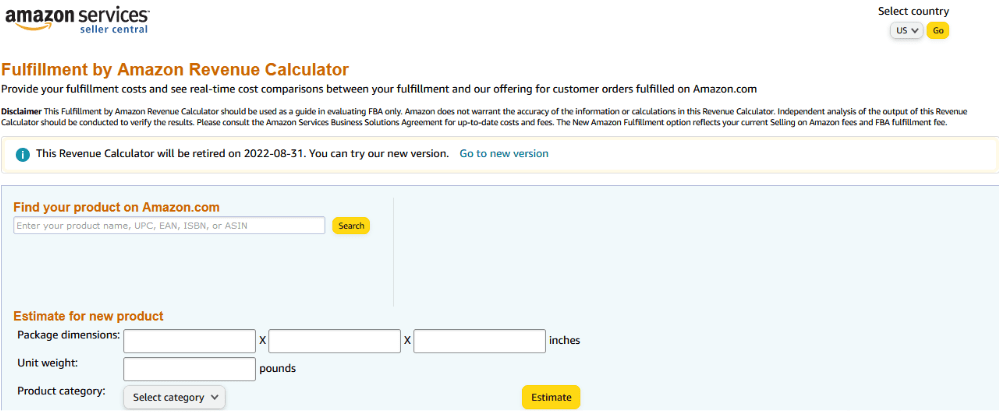
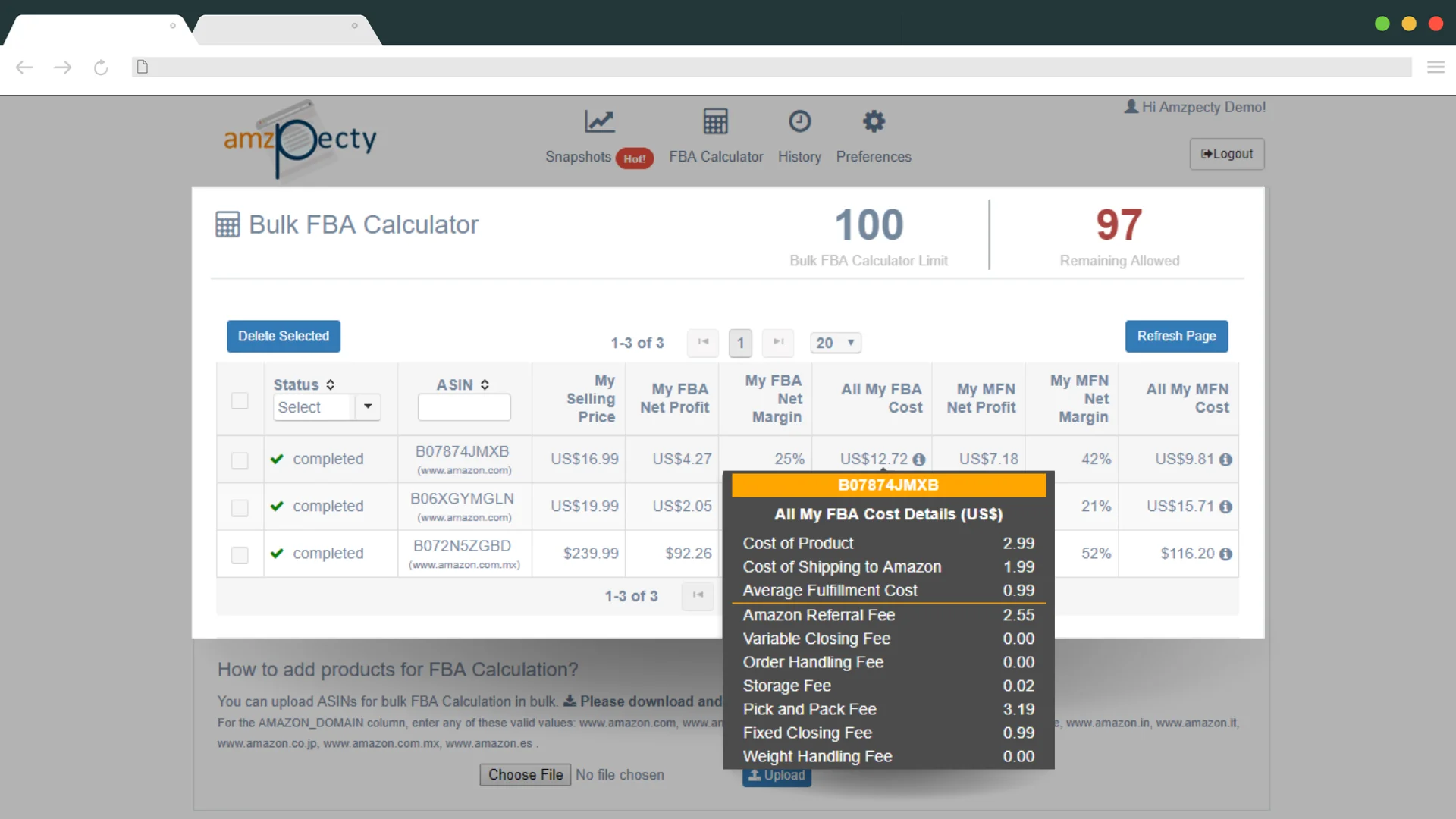
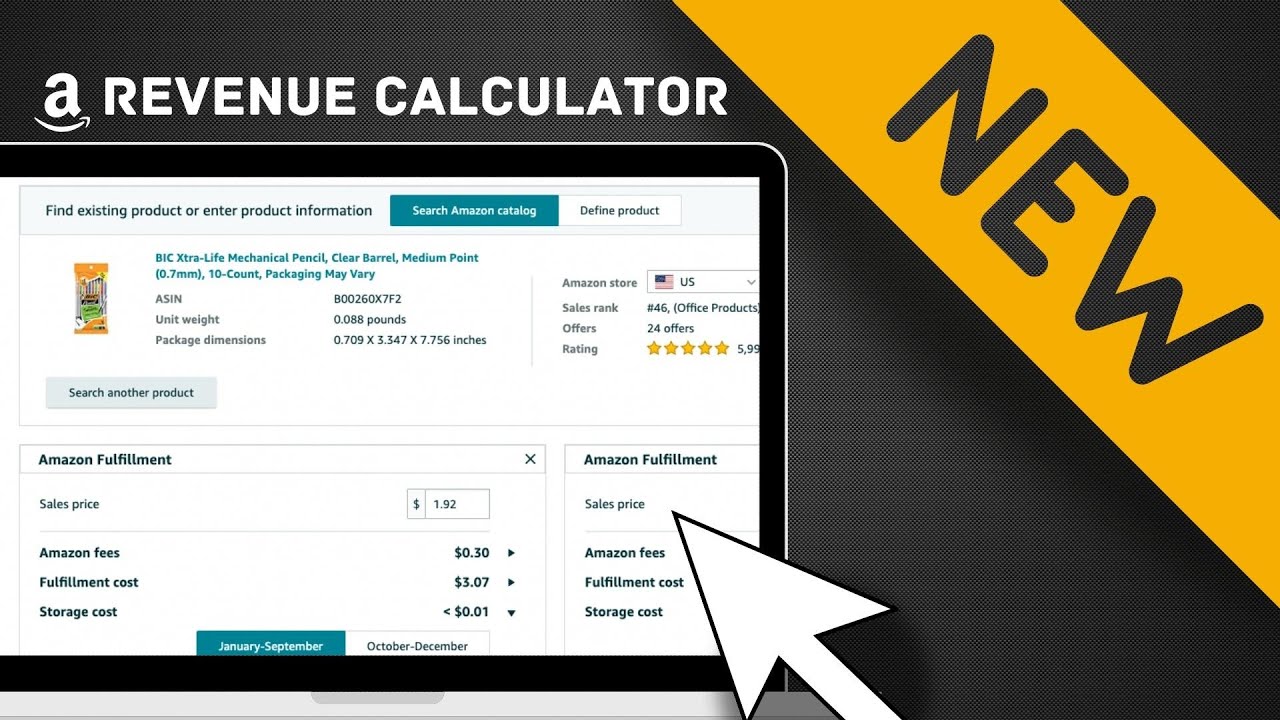
Amazon Seller Central Fba Calculator

The first time you log into Amazon Seller Central, it feels less like a dashboard and more like the cockpit of a commercial airliner—a bewildering array of switches, dials, and blinking metrics, all of which seem to be screaming for your attention. Amidst the chaos of FBA inventory reports and advertising spend, there sits a humble tool that rarely gets the spotlight: the FBA Calculator. It is not flashy. It does not offer gamified rewards. Yet, for the modern e-commerce alchemist, this calculator is the philosopher’s stone that turns raw product costs into pure, actionable profit margins.
Historically, the FBA Calculator was a static, clunky spreadsheet that required manual input of dimensions and weights, often leading to a game of ‘guess the dimensional weight’ that ended in tears. Today, it has evolved into a dynamic, quasi-psychic entity that predicts fulfillment fees with startling accuracy. It matters now more than ever because we are living in the era of the margin crunch. With tariffs fluctuating, container shipping costs spiking, and the average Amazon customer possessing the attention span of a caffeinated goldfish, knowing your exact take-home profit before you click “Buy Now” on inventory is not just smart—it’s survival instinct.
The Hidden Psychology of the Fee Structure
Here is a dark fun fact that most seasoned sellers know but rarely admit: Amazon’s fee structure is designed to optimize their warehouse efficiency, not your profitability. The calculator forces you to confront this reality. When you punch in a 2.5-pound, oddly shaped kitchen gadget, the calculator doesn’t just spit out a number; it reveals the invisible tax on clumsiness. Amazon charges a referral fee (typically 15% but higher on some categories like jewelry), but the real monster is the fulfillment fee, which has tiers based on size and weight. The calculator shows you that a product that is 1 inch too long in one dimension can shift you from a “Large Standard” tier to an “Oversize” tier, instantly erasing $8 of your margin and replacing it with the sinking feeling you get when you realize you’ve been subsidizing Amazon’s real estate costs.
Must Read
Psychologically, this tool taps into what behavioral economists call “loss aversion.” When you manually calculate your margins with a simple profit formula, you might gloss over the storage fees (charged monthly per cubic foot) and the disposal fees for returned items. But the FBA Calculator, especially the advanced third-party versions, forces you to stare into the abyss of the “prep fee” and the “removal fee.” It’s a digital mirror that reflects your business model’s ugly underbelly. Culturally, this has birthed a micro-genre of YouTube tutorials where sellers dramatically reveal how a “cheap” $12 product design is actually a money pit, using the calculator as the evidence in their courtroom. It has turned margin analysis into a spectator sport.
Moreover, the calculator has shifted the power dynamic from gut-feeling arbitrage to data-driven dominance. Ten years ago, a seller could get away with “eyeballing” a product’s viability. Now, with 4 million active sellers, the calculator is the great equalizer. It doesn’t care about your marketing charm or your brand story; it cares about the cubic weight of your bubble wrap. This is the brutal, modern reality of e-commerce: the math always wins. The tool has inadvertently become a cultural artifact of the hustle economy, representing the intersection of hope and hard mathematical realism. It reminds us that for every Amazon success story, there are hundreds of sellers who ignored the calculator’s prophecy and are now renting a storage unit full of unsold fidget spinners.
Case Studies, Scenarios, and Actionable Takeaways
Consider the case of Sarah, a seller of handmade leather wallets. She was doing okay using Amazon’s raw calculator, but she never factored in the cost of her custom packaging (because it looked “premium”). When she used a more sophisticated calculator that allows for packing slip weights and custom prep costs, she discovered her margin had dropped from 28% to 11%—unsustainable. The actionable takeaway? You must treat the calculator as a living document, not a one-time oracle. Re-run your numbers every quarter, or whenever Amazon announces a fee change (which happens with terrifying regularity, usually in January and April). If your product has seasonal weight variation (like holiday-themed items with heavier inserts), run a worst-case scenario calc.

Another scenario: Tom, a dropshipper transitioning to FBA, used the calculator to realize that his product’s dimensions were wildly inefficient. He shipped a 10x10x8 box for a product that could fit in a 10x6x4. By switching to vacuum-sealed packaging and custom poly mailers instead of boxes, he reduced his dimensional weight tier. This single change, highlighted by the calculator’s comparison feature, saved him $2.30 per unit. On 5,000 units a month, that’s $11,500 annually—enough to pay for a decent used car or a small content marketing agency. The lesson here is to use the calculator not just for pricing, but for design engineering. The tool should influence how you source, how you package, and even how you negotiate with your manufacturer. If you can reduce the weight by 100 grams, you might lose a lower tier.
A third scenario involves the controversial “FBA vs. FBM” debate. The calculator allows you to compare the cost of FBA (with its high fulfillment fees but Prime eligibility) against FBM (Fulfillment by Merchant, where you pay for shipping but save on storage). In a recent volatile freight market, many sellers are using the calculator to realize that for over-sized, slow-moving items, FBM is actually cheaper. The calculator reveals that the Prime badge is a luxury you pay for. For heavy items like dumbbells, the FBA fee can eat 40% of your gross revenue. The actionable takeaway is to segment your catalog. Run the calculator on your top 20 SKUs; if the FBA fee exceeds the FBM shipping cost by more than $1, and you have the logistical bandwidth, reconsider. The tool isn’t a lock-in; it’s a decision matrix.
Finally, the psychological trap of the “break-even” price. Many sellers obsess over using the calculator to find the lowest price that keeps them at zero. This is a dangerous game. The calculator’s hidden feature is its ability to show you the opportunity cost of your pricing. Dominating a Buy Box is useless if you are giving away units to Amazon’s warehouse gods. A practical takeaway: always add a 5% “risk buffer” to whatever the calculator says your minimum margin is. This buffer accounts for returns (which cost you the inbound shipping plus the FBA disposal fee), lost items in transit, and the occasional fraudulent “item not received” claim. If the calculator says you can price at $19.99, try pricing at $21.99 and testing conversion. You might lose 10% of conversions but gain 20% more profit per sale. Trusting the calculator for guidance, not as a hard limit, is the mark of a mature seller.
Frequently Asked Questions: The Toolkit Unpacked
1. Is the Amazon Seller Central FBA Calculator accurate enough for actual business decisions?
Yes, but with caveats. The native calculator inside Seller Central provides a solid baseline, but it operates on the assumption of standard packaging and average weights. It uses the current fee schedule, which is updated whenever Amazon changes its rates. However, it does not account for your specific inbound shipping costs (the cost to get the inventory to Amazon’s warehouse), your prep labor, or your advertising cost per sale (ACOS). For rigorous financial planning, you should treat the calculator’s output as your “gross margin” and then subtract your inbound freight and marketing costs manually. Tools like SellerAmp or Helium 10 offer enhanced calculations that include inbound shipping and offer a clearer picture, but the native tool is an excellent starting point for a quick viability check.
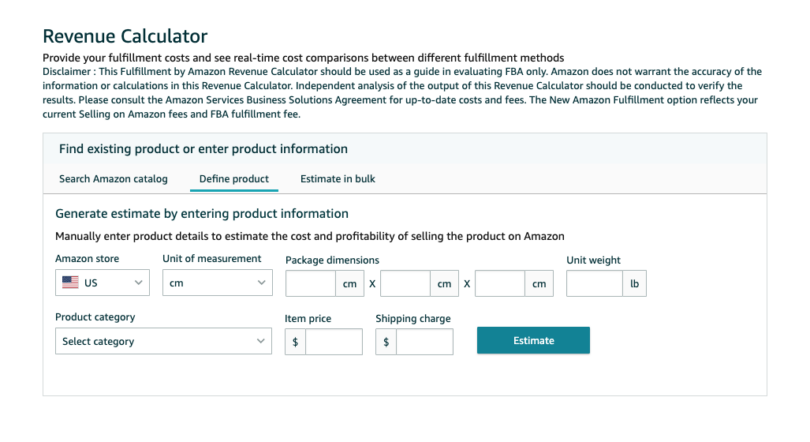
The accuracy also depends on how you input the data. If you estimate your dimensions instead of taking exact measurements from the manufacturer, you will be playing Russian roulette with your margins. Amazon uses “dimensional weight” (DIM weight) which calculates based on (LxWxH)/139 for domestic shipments. A slight half-inch error in height could push you into a different billing category. Therefore, the calculator is accurate only if your data is accurate. Always confirm your product’s final shipped dimensions—including the poly bag or box you use—and never trust the raw product dimensions provided by an overseas supplier who often quotes the smallest possible numbers. Spend the $10 on a digital scale and a measuring tape; it’s the best ROI in your business.
2. Why do my actual fees frequently differ from what the calculator says?
The most common culprit is the “dimensional weight” discrepancy we just touched on. Sellers often measure the product itself, not the final packaged unit. If you use a bubble mailer versus a rigid box, the dimensions change, and so does the fee. Additionally, Amazon has a rule that charges the greater of the dimensional weight or the actual weight. A light but bulky item (like a plastic Christmas wreath) will be charged for the space it occupies, not its weight. The calculator doesn’t know you’re packing it poorly; it assumes optimal packing. Another reason for the divergence is the “Amazon Prep Service” fee. If you opt to have Amazon label your products or repackage them (because they arrived slightly damaged), they bill you per unit, which is not included in the standard calculator’s default output.
Furthermore, there are hidden “Other Transaction” fees. For apparel, there’s an extra $0.30 closing fee. For media items (books, DVDs), there are per-item charges. The calculator knows this, but you might not if you haven’t selected the correct category on the dropdown. Finally, returns are a major culprit. The calculator assumes every unit is successfully sold and not returned. When a customer returns a product, Amazon deducts the original FBA fee portion (usually half) from your account, but you also lose the profit from the sale and potentially pay for the return shipping. This creates a “phantom fee” that makes your average margins per unit lower than the calculator's static projection. The best practice is to input an estimated return rate percentage into your spreadsheet and adjust your expected margin accordingly.
3. Can the FBA Calculator help me choose between private label and wholesale?
Absolutely, it is the primary decision-making tool for this fork in the road. For private label products (where you build a brand on a generic item), the calculator helps you analyze if your unique branding and slightly premium pricing can overcome the higher manufacturing and prep costs. You can input your total landed cost (manufacturing + shipping) and see if the remaining profit justifies the risk. For wholesale (buying established brands), the margins are typically razor-thin—often only 10-20%. The calculator is crucial here because it will immediately show you if a wholesale item is even resellable on Amazon. Many wholesale sellers use it to filter out thousands of potential products because the fulfillment fee plus the referral fee eats the entire trade discount you received from the brand.
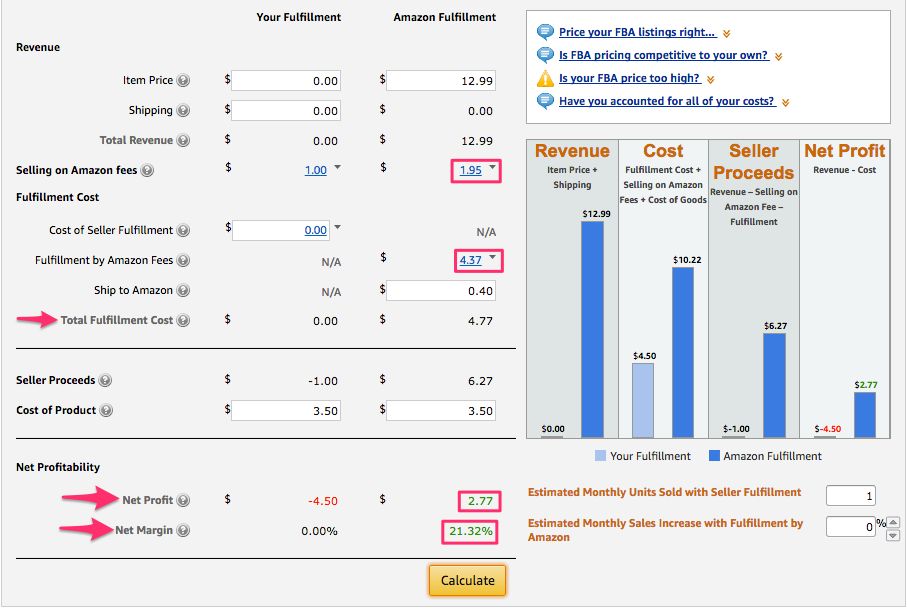
Specifically, the calculator reveals the “advertising bleed.” If you have a wholesale product with a 15% margin, but to win the Buy Box you need to run ads with an ACOS of 30%, you are losing money on every sale. The calculator doesn’t show that, but by using it to lock in your maximum allowable cost (MAC), you can set a rule: “If my total fee is over X, I won’t buy it.” This automates your sourcing. For private label, the calculator allows you to play with the “variable” of your cost of goods. If the calc shows you need a 45% margin to survive, you know you need to source that widget for less than $2.00 instead of $2.75. It turns an abstract business strategy into a concrete numbers game, ensuring you aren’t relying on hope to hit profitability.
4. How often should I update my calculations and check the fee schedule?
You should check the fee schedule every time you log in, at least for a quick glance, but formally recalculate your top 50 SKUs at the start of every quarter. Amazon typically announces fee changes in the late fall (effective January 1st) and sometimes a mid-year adjustment in April or June. However, they also have seasonal “peak fulfillment fees” that apply from October to December, which the calculator will reflect if you toggle the date. Maintaining a running spreadsheet with your calculations is essential. Don’t just rely on the calculator’s live output; a spreadsheet allows you to see historical trends. If you notice your average FBA fee has been creeping up by $0.10 every month, it might be because your product’s dimensions are being re-measured by Amazon’s robots and they are finding you are slightly bigger than you claimed.
There is also the issue of storage fees. The calculator only shows the sending fees and selling fees, but not the monthly storage costs. You need to update your Long-term storage fee projections (charged on items sitting in the warehouse for over 365 days) separately. The frequency of checking your calculations should also spike before new product launches. Don’t just rely on an estimate from six months ago. Re-price your inventory using the calculator at the moment you are about to send a shipment. If the fees have changed since you first sourced the product, you might need to adjust your pricing strategy before you ship, or cancel the shipment outright. The calculator is a snapshot, not a permanent tattoo; treat it as a living metric.
5. Are there hidden limitations of the free calculator that might hurt my business?
Yes, the most significant limitation is that the free Amazon calculator is an isolationist tool. It assumes your product is a standalone entity, ignoring the gravity of your advertising costs (PPC), your list-building costs, and the cost of your professional selling plan ($39.99/month). It also ignores the cost of your own time and tools. For example, if you use a repricer tool that costs $100/month, that overhead is not calculated per unit. More critically, the native calculator does not account for the “average manufacturing defect rate.” It assumes 100% of your units are sellable. In reality, a 2-3% defect rate (units that arrive damaged or are mis-picked) is common. Those unsellable units incur return fees, removal fees, or disposal fees—none of which appear in the calculator’s optimistic output.

Furthermore, the calculator fails miserably when dealing with multi-channel fulfillment (MCF). If you use your FBA inventory to ship orders from your own Shopify store or from eBay, the fees are different (and often higher) than standard FBA sales. The free calculator will mislead you into thinking you can profitably use FBA for your website, only to find out later that the MCF fee is significantly higher. Another limitation is the lack of “promotional fee” considerations. If you want to run a Lightning Deal ($150 fee) or a Best Deal, that fixed cost isn’t amortized per unit in the calculator. You must manually divide the promo fee by your expected sales volume and add that to your costs. In short, the free calculator is an excellent foundation, but you must build a roof of extra fees, or you will get soaked when the storm of reality hits.
The FBA Calculator, in its quiet utility, mirrors a fundamental human truth: we are all obsessive price-checkers, whether we admit it or not. It appeals to our deep-seated desire for control in an uncontrollable market. By plugging in numbers, we are not just calculating fees; we are constructing a security blanket woven from digits. This tool connects to our daily lives because it represents the modern struggle for transparency. In a world where everything is a subscription and hidden costs lurk in the fine print, the calculator is a notorious rebel—it exposes the fine print before you sign.
It also reflects our innate human bias towards optimism. We initially want to use the calculator to confirm our good idea, to validate the hours we spent sourcing that “perfect” product. The tool, however, is indifferent to our hopes. It asks a cold, hard question: “Can you make money, yes or no?” This tension between our emotional investment and the cold math is the essence of entrepreneurship. The calculator doesn’t judge; it just subtracts. And in that subtraction, we find a strange clarity—a peace that comes from knowing, definitively, whether your hustle has legs.
Ultimately, the FBA Calculator is a reminder that in the digital marketplace, attention spans are short, but margins are shorter. It forces us to be disciplined, to treat our passion projects as if they were cold, hard financial instruments. Whether you are a side-hustler shipping 40 units a month or a seven-figure brand, engaging with this calculator is an act of self-respect. It protects you from your own wishful thinking. It is the quiet, unglamorous guardian of your sanity, ensuring that when you log off, you’ve made a living, not just a gamble. And in today’s economy, that kind of certainty is the rarest luxury of all.