What Are Good Gaming Internet Speeds
The modern digital battleground is not a physical realm of sinew and steel, but a volatile stream of photons hurtling through fiber-optic cables and coaxial lines. For the dedicated gamer, the perceived "smoothness" of a session hinges not on raw willpower, but on a delicate interplay of data packets, server tick rates, and the unforgiving laws of physics. We often chase the allure of massive download numbers, yet the true alchemy of online play lies in a quieter, more rhythmic metric: latency. This is the temporal distance between your input and the game world's reaction, and it is governed by the speed of light in glass and the routing decisions of internet service providers (ISPs), making the pursuit of "good speed" a study in applied network physics rather than simple bandwidth acquisition.
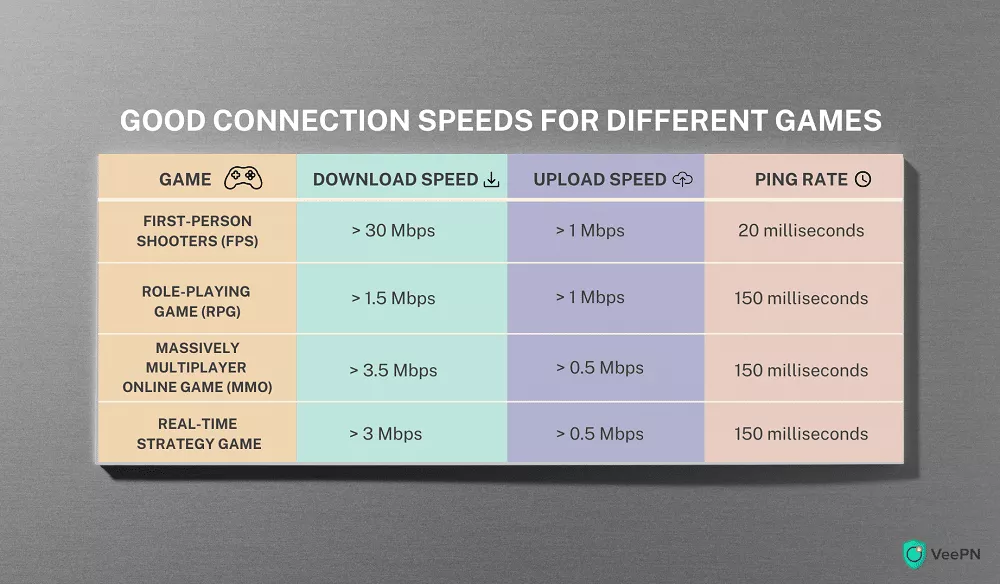
To understand your connection, you must first dismantle the myth that megabits per second (Mbps) alone dictate performance. Bandwidth is the width of the pipe; latency is the speed of the water traveling through it. A 500 Mbps connection can feel sluggish and unresponsive if your data must traverse a congested, geographically distant server, resulting in a high ping (measured in milliseconds). Conversely, a meager 25 Mbps connection can feel razor-sharp if your latency is sub-20ms. The human brain, through the vestibulo-ocular reflex and predictive motor control, compensates for sub-100ms delays, but beyond that, we enter the uncanny valley of input lag, where our actions feel detached and dreamlike. Thus, the target is not sheer throughput, but a harmonious equilibrium where packet delivery is both rapid and consistent.
Furthermore, the rise of live-service games and 128-tick servers has introduced a new biological bottleneck: the human reaction time, which averages around 250ms for visual stimuli. While we cannot hack our nervous system, we can ensure that the network does not add artificial latency on top of our natural physiological limits. This is where the concept of jitter enters the equation. Jitter is the variance in packet arrival times, a statistical deviation that causes micro-stutters and rubber-banding—phenomena far more disruptive than a constant, predictable delay. Your connection needs to be a metronome, not a jazz drummer, providing a steady, rhythmic pulse of data that your brain can anticipate and synchronize with.
Must Read
The Hidden Biology and Physics of Packet Loss and the TCP/IP Stack
Beneath the surface of every match lies a complex chemical and systemic negotiation between your hardware and the remote server. When you issue a command, your input device transduces mechanical energy into electrical signals, which are then quantized into 1s and 0s. These packets, often only 1,500 bytes in size, are transmitted via the Transmission Control Protocol (TCP) or User Datagram Protocol (UDP). UDP is the gamer's ally, prioritizing speed over reliability by omitting error-checking handshakes. However, this means that if a packet is dropped—perhaps due to a noisy electrical signal from a faulty Ethernet cable or Wi-Fi interference from a microwave oven disrupting the 2.4GHz band—it is simply gone. The game server must then extrapolate your position, leading to the dreaded "teleporting" effect.
The biological reaction to this data loss is a subtle but measurable spike in cortisol. Our brains are wired to detect anomalies in spatial continuity; a sudden jump in our character's position triggers the amygdala’s threat detection system, reducing our ability to focus on strategic multitasking. This is not mere frustration; it is a neurological stress response. To mitigate this, we must understand that the physical layer of the network is paramount. A copper wire, subject to electromagnetic interference (EMI) from nearby power lines, is a far less stable transmission medium than fiber optics, which uses total internal reflection to bounce light pulses with zero electrical interference. This is why a direct wired connection is non-negotiable for competitive play; Wi-Fi, despite its convenience, introduces environmental packet loss that no software tweak can fully rectify.
Moreover, the bufferbloat phenomenon—where excessive buffering on your router causes ping spikes during uploads—is a systemic failure of network queues. When your upstream pipe is saturated by a cloud backup, the router’s buffer holds incoming game packets hostage behind a wall of bulk data. This artificially inflates latent period, creating a "lag spike" that feels like temporal paralysis. The solution lies in Active Queue Management (AQM), specifically algorithms like CoDel or CAKE, which intelligently drop packets from the queue to prevent latency from ballooning. This is the scientific art of controlled chaos, ensuring that time-sensitive packets leapfrog the bulk traffic, preserving the integrity of your neural feedback loop.
Strategic Optimization Hacks for Sub-20ms Gameplay
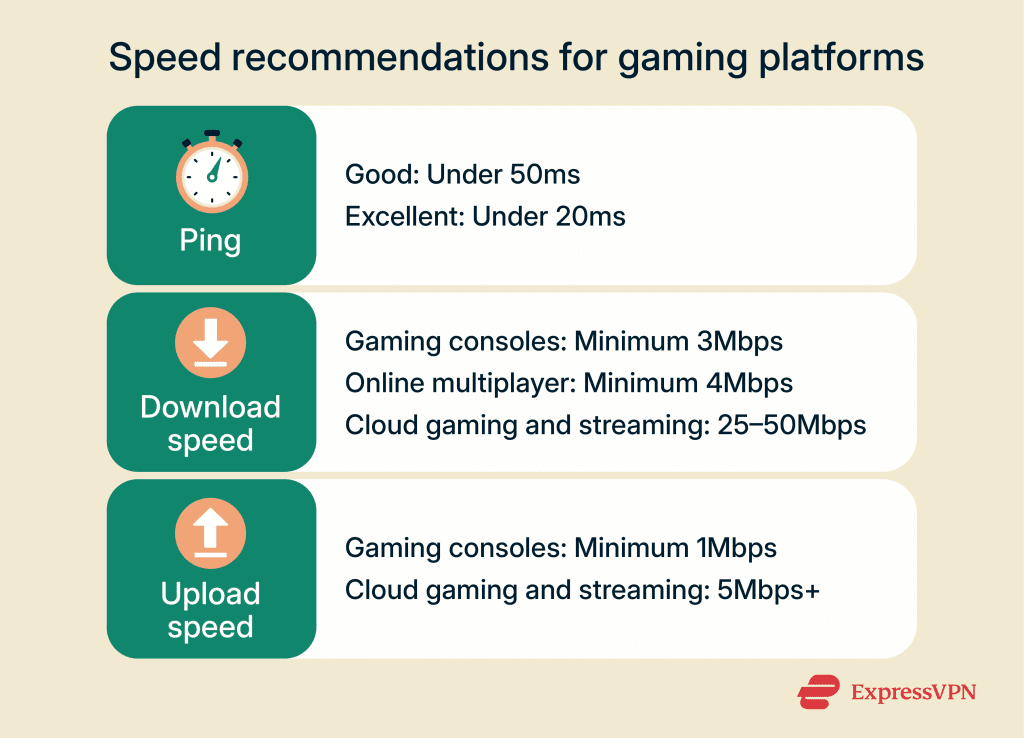
Mastering your internet speed is a rigorous exercise in system-level optimization, requiring you to treat your home network as a laboratory. First, perform a baseline diagnostic using a tool that measures jitter and packet loss, not just download speed. Tools like PingPlotter or Waveform’s bufferbloat test provide a temporal map of your connection’s stability. You are not looking for raw speed; you are looking for a flat-line latency graph. If jitter exceeds 5ms, your network is unstable. Move from Wi-Fi to a Cat 6 (or better) shielded Ethernet cable, ensuring it is routed away from power cables to minimize EMI. This single change often reduces jitter by 50% or more.
Second, log into your router and enable Quality of Service (QoS) rules that prioritize your gaming console or PC’s MAC address. Go a step further by implementing per-device bandwidth limits to throttle background downloaders on your network. The goal is to cap your upstream bandwidth to 80% of your measured maximum. This reserves headroom for the TCP acknowledgment packets and prevents the bufferbloat cascade. For advanced users, flashing your router with DD-WRT or OpenWrt firmware allows you to install the CAKE algorithm, which optimizes fair queuing and actively manages the buffer length, effectively eliminating latency spikes under load. It is the closest thing to a network superpower.
Third, investigate your routing path to the game server. Use a traceroute command to identify your local ISP’s gateway. If you see high latency at the first or second hop, the issue is internal. If the latency spike occurs at a distant regional node, you are at the mercy of internet backbone peering agreements. In this case, a VPN (Virtual Private Network) with gaming-specific routing can sometimes—not always—find a more efficient path, bypassing a congested transit provider. The hack is to use a VPN with a server geographically close to the game server, not close to you. This can shave 10-20ms off your ping by optimizing route selection through proprietary lines. Test this rigorously, as a poorly optimized VPN adds overhead.
Fourth, disable Nagel’s Algorithm (TCP_NODELAY) if you are playing on PC. This algorithm pauses the sending of small packets to batch them together for efficiency, which is anathema to real-time inputs. Game engines often disable this by default, but some older titles or overlay software do not. Using a network tweak tool like TCP Optimizer, you can force the disabling of this delay, ensuring immediate transmission of your input commands. Combined with setting your Windows timer resolution to 0.5ms via a tool like TimerResolution, you reduce the OS scheduling latency, allowing your commands to reach the network stack faster, shaving precious milliseconds off your end-to-end reaction time.
Finally, consider the hardware upgrade path of your modem. If you rent a modem from your ISP, it may be outdated with a poor chipset that introduces processing delay. Upgrading to a DOCSIS 3.1 modem with a low-latency mode (if on cable) or ensuring your ONT (Optical Network Terminal) is directly connected to your router (avoiding a second router’s NAT layer) is critical. Put your main router into bridge mode and use a dedicated, high-quality gaming router with a potent CPU for packet routing. This reduces the "router lag" portion of your total latency, which is often overlooked but can account for 5-10ms of constant delay.
Frequently Asked Questions on Gaming Latency and Throughput
Is 100 Mbps enough for gaming, or do I need gigabit internet?
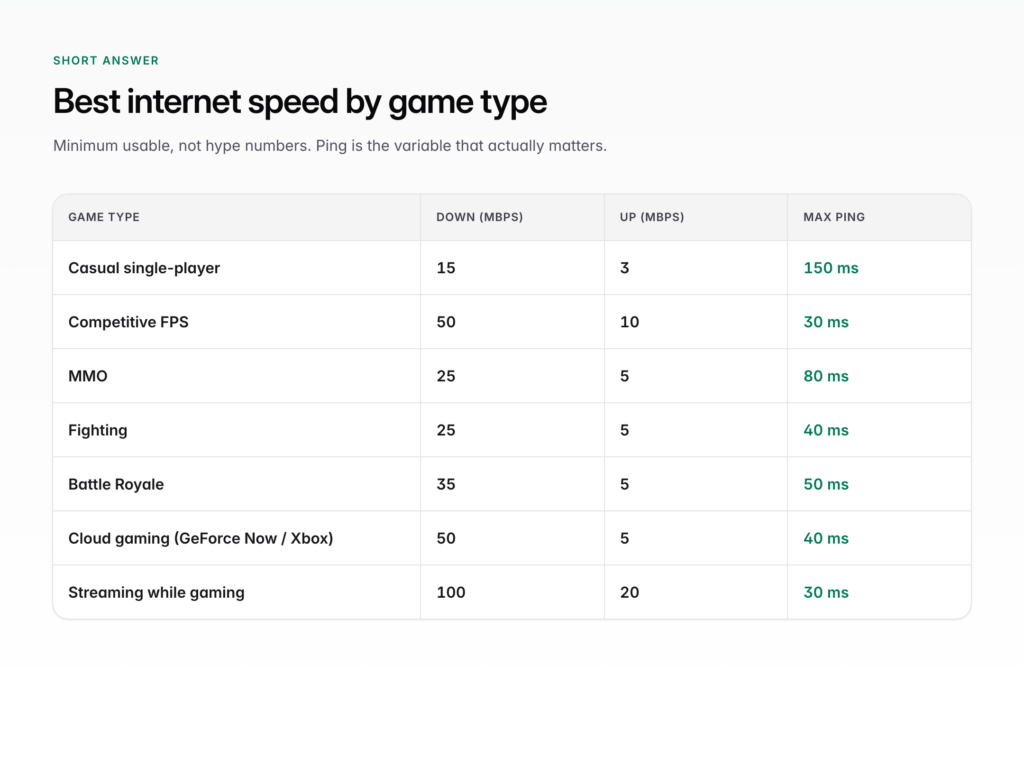
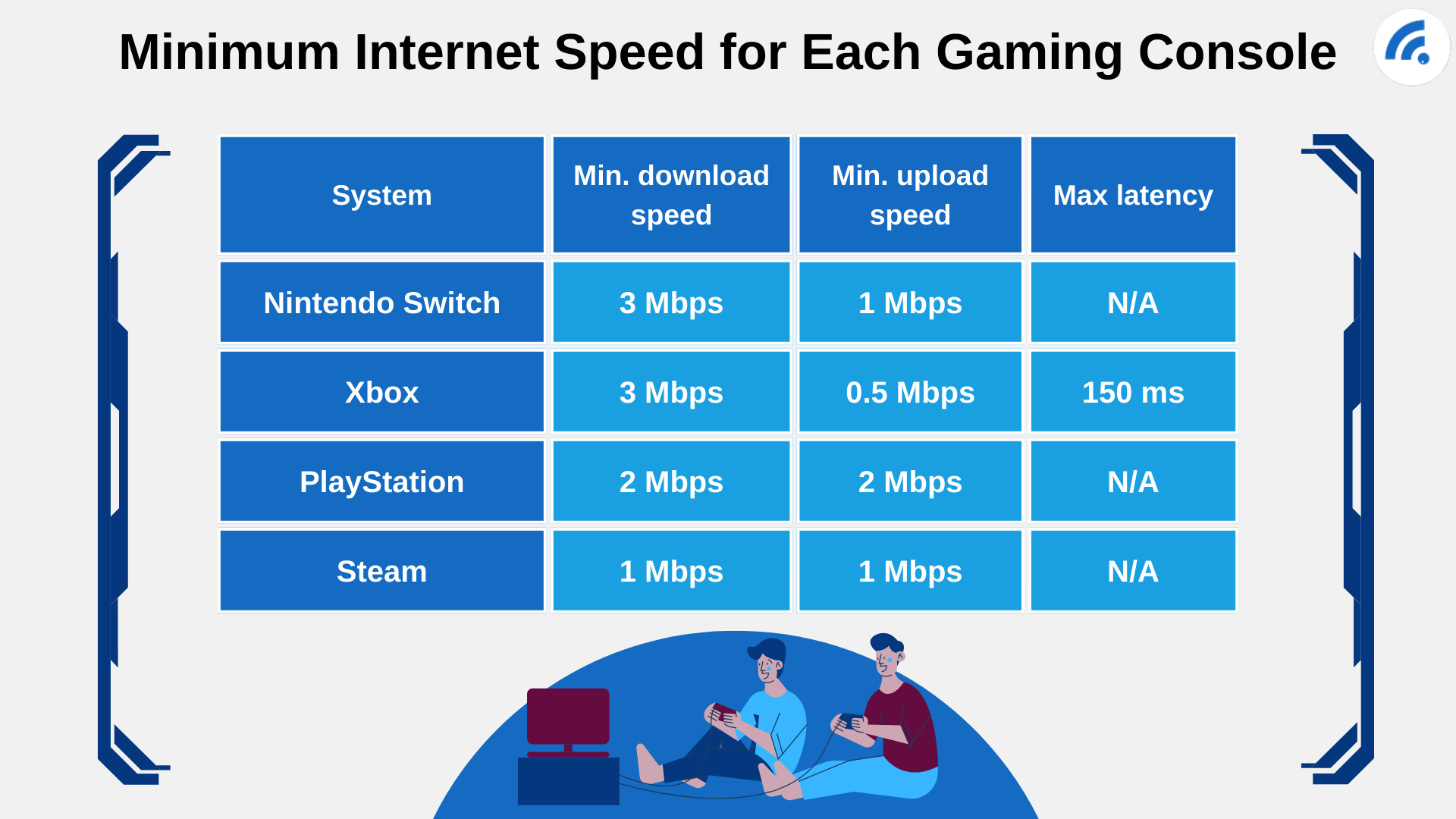
For the act of gaming itself, 100 Mbps is astronomically overkill. A modern multiplayer title like Call of Duty or Fortnite typically consumes between 5 Mbps and 25 Mbps of bandwidth. Even a 4K/120fps stream from a cloud gaming service like GeForce NOW only requires around 45-50 Mbps for optimal quality. Therefore, raw download speed is not the limiting factor. The primary benefit of a gigabit connection is the headroom it provides for simultaneous household usage—like 4K streaming, video conferencing, and massive game downloads (which are often 100GB+). The real metric you should care about is the latency under load. A 100 Mbps connection with proper QoS and low jitter will absolutely demolish a 1 Gbps connection with high jitter in a competitive esports title. Focus on stability, not sheer volume.
However, there is a caveat relating to your upload speed. If your plan offers asymmetric speeds (e.g., 100 Mbps down / 10 Mbps up), the upload pipe is your Achilles' heel. Your client is constantly sending your position, actions, and voice chat data upstream. If you are watching a 4K stream simultaneously, your upload bandwidth may be saturated, causing catastrophic packet loss for your game. Ensure your upload speed is at least 10-15 Mbps to accommodate game data plus minor background traffic, and always apply QoS limits to your upload stream.
Why does my ping vary drastically between games or servers?
This variance is a product of geographic distance and network routing. Your ping to a server in your city will be fundamentally lower than to a server on another continent due to the speed of light in fiber (approximately 200,000 km/s). A transatlantic round trip of 10,000 km adds a physical floor of ~100ms of latency. Beyond distance, the routing structure of the internet—Autonomous Systems (AS) and the Border Gateway Protocol (BGP)—determines the path. Your ISP might have a peering agreement that sends traffic to a major internet exchange, but if the destination server’s network has a congested interconnect, your packets will queue up, forcing your ping to spike. This is why you see "low ping" to one regional server and "high ping" to another located physically nearby—the logical path differs from the physical path.
Furthermore, game engines implement server selection logic. They may prioritize finding a match quickly over ping optimization, dropping you into a server with 80ms latency instead of waiting 10 seconds for a 20ms server. You can manually bypass this by using the game's server browser (if available) or by setting your matchmaking region to a specific data center. For games like League of Legends or Valorant, the client will show you your approximate ping to each region. If you notice instability, run a traceroute to the IP address of the game server; you will often find a specific hop (the "peering point") that is causing the delay. You can sometimes report this to your ISP to request a route change, though this is often a long shot.
Does a 144Hz monitor require higher internet speeds to see a benefit?
Absolutely not—this is a critical misconception. Your monitor’s refresh rate and your internet speed are two independent systems that interact only in the final rendering stage. A 144Hz monitor reduces the display latency, which is the time between your GPU outputting a frame and the monitor physically showing it. This reduces the temporal gap between your input and visual feedback, making the game feel more responsive. However, it does not change the network’s contribution to latency. If your network ping is 80ms, a 144Hz monitor will still display your character’s movement 80ms after you press the key; it will just do so without additional display lag.
The synergistic benefit lies in information density. With a low-ping (sub-30ms) connection, your client receives server updates at a high frequency. A high refresh rate monitor can display these incremental updates (and the micro-animations of enemy movements) more smoothly. But if your ping is high and your jitter is severe, the visual stuttering on a 144Hz screen will be just as jagged as on a 60Hz screen. To master your setup, you need to understand that reducing the total system latency is key. This is the sum of input latency, network latency, PC processing time, and display refresh. A high-refresh monitor and a high-speed internet connection are complementary, not interchangeable—you need both for a truly responsive experience.
What exactly is "bufferbloat," and how do I know if I have it?
Bufferbloat is the silent killer of competitive gaming. It occurs when your router’s network buffer, designed to absorb temporary data bursts, becomes persistently full. This happens most often when you are uploading (e.g., streaming, cloud save, or sending a large file). The router’s buffer fills up with this bulk data, and when your game’s time-sensitive UDP packet arrives, it is queued behind the backlog. This causes your ping to spike from, say, 15ms to 300ms until the queue drains. It is a systemic flaw in how many consumer routers handle congestion—they prioritize "making the data fit" over "making the data timely." You can diagnose it by running a bufferbloat test (e.g., from Waveform.com), which measures your latency while simultaneously saturating your download and upload links.
The test will show you "Grade A" (no latency increase under load) to "Grade F" (massive latency increase). If you score poorly, the fix is not to buy a more expensive internet plan, but to control your own router. The most effective hack is to enable SQM (Smart Queue Management) on your router. This often involves setting your bandwidth limits manually to 85-90% of your actual provisioned speed. This slight "artificial capping" prevents the buffer from ever filling by shaping traffic aggressively. If your ISP-provided router lacks these features, you must invest in a router that supports OpenWrt with the CAKE scheduler, which is currently the gold standard for eliminating bufferbloat.
Is a wired Ethernet connection always superior to the newest Wi-Fi 6/6E?
In the majority of cases, yes, for one fundamental reason: determinism. Wi-Fi 6 (802.11ax) is a technological marvel that can achieve throughput rivaling Ethernet and offers lower latency than previous Wi-Fi generations. However, it still operates in a shared, unlicensed spectrum. Your transmission is subject to interference from walls, microwaves, Bluetooth devices, and your neighbors' networks. The Wi-Fi protocol uses Carrier Sense Multiple Access with Collision Avoidance (CSMA/CA), which requires the radio to "listen" before transmitting. This inherently introduces random back-off times and variable latency. Ethernet, conversely, provides a dedicated, full-duplex point-to-point link with no carrier sensing, resulting in perfectly consistent latency and zero packet loss due to interference.
While Wi-Fi 6E offers a pristine 6GHz band with lower congestion, the physics of RF propagation still introduce jitter. For a competitive gamer, the difference between 2ms Ethernet jitter and 8ms Wi-Fi jitter is perceptible in fast-twitch scenarios. That said, if you must use Wi-Fi, ensure you are using Line-of-Sight positioning to the access point, utilize the 5GHz band (or 6GHz if available), and disable Bluetooth radios on your PC if they are physically close to the Wi-Fi antenna, as they cause desense. The rule of thumb is: if you are playing any FPS or MOBA at a high rank, plug in the cable. Wi-Fi is for casual gaming, web browsing, and downloading games overnight.
The Pragmatics of Latency: Respecting the Time Continuum
When we dissect our internet connection, we are not merely chasing better kill-death ratios; we are engaging in a profound exercise in respecting the temporal fabric of cause and effect. By understanding that data has weight and distance has a cost, we become more efficient digital citizens. We learn to prioritize the stability of our physical hardware over the vanity of high-number specs. This mindfulness translates into all areas of life—we stop blaming "the system" (the ISP) and start taking responsibility for our local environment, optimizing the variables we can control. This is scientific pragmatism at its finest, empowering us with the agency to shape our digital reality.
Moreover, this pursuit of low latency is, at its heart, a pursuit of presence. The goal is to remove the technical layers that separate us from the virtual moment, allowing our biology to operate in a state of flow. When the network is invisible, the game becomes an extension of our nervous system. This respect for packet-level physics turns us into better problem solvers, recognizing that every millisecond saved is a small victory over entropy. It is a quiet, nerdy rebellion against the sluggishness of the world, proving that with a bit of scientific rigor, we can bend time to our will, one ping at a time.