Spotify Add Multiple Songs To Playlist

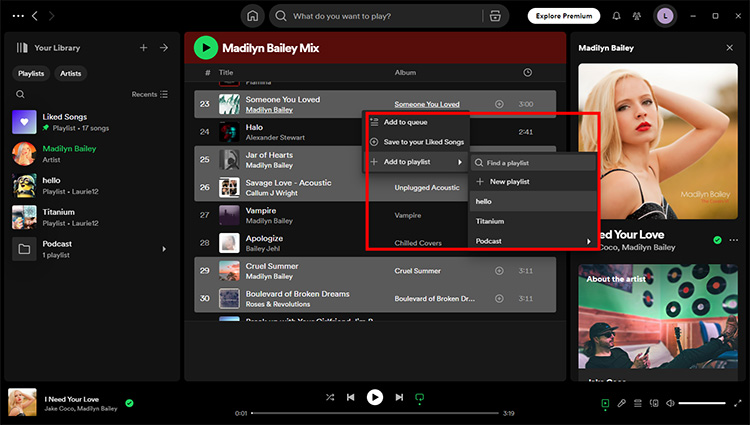
The purpose of this feature is to allow users to add multiple songs to their playlists in one go, rather than having to add each song individually. This is a huge time-saver, especially for those who like to create lengthy playlists for workouts, parties, or road trips. By being able to bulk add songs, users can focus on enjoying their music rather than getting bogged down in tedious admin tasks.
Benefits of Adding Multiple Songs
So, what are the benefits of being able to add multiple songs to a playlist? For starters, it's a great way to discover new music - users can easily add multiple songs from a particular genre or artist to their playlist, and then explore from there. This feature also makes it easy to share music with friends, as users can add multiple songs to a collaborative playlist in one go.
Must Read
Another benefit of this feature is that it allows users to organize their music more efficiently. By being able to add multiple songs to a playlist at once, users can quickly and easily create playlists for different occasions or moods. For example, a user might create a playlist for a workout and add multiple upbeat songs to it, or create a playlist for a relaxing evening and add multiple mellow songs to it.
As
Spotifycontinues to evolve and improve, features like adding multiple songs to a playlist are becoming increasingly important. With the rise of music streaming, users are looking for ways to make their music experience more personalized and enjoyable. By allowing users to add multiple songs to a playlist, Spotify is giving users the tools they need to create their perfect music experience.
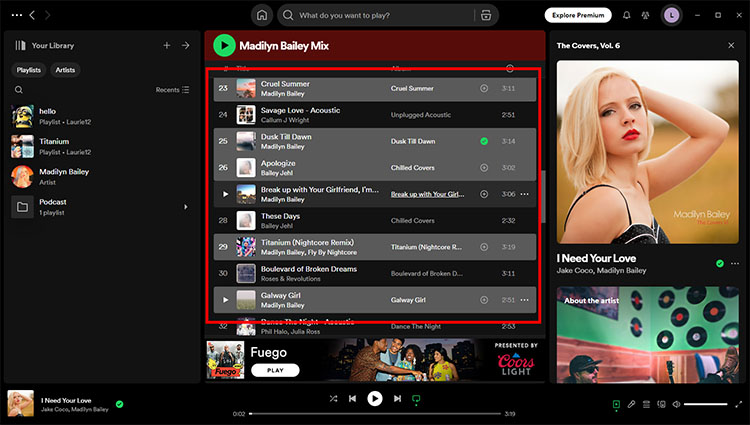
So, how do you add multiple songs to a playlist on Spotify? It's easy - simply select the songs you want to add, right-click, and choose "Add to Playlist". You can also use the Spotify desktop app to drag and drop multiple songs into a playlist. Either way, the process is quick and easy, and allows you to get back to enjoying your music in no time.
Tips and Tricks
For those looking to get the most out of this feature, there are a few tips and tricks to keep in mind. For example, users can use keyboard shortcuts to quickly add multiple songs to a playlist. By holding down the Ctrl key (or Cmd key on a Mac), users can select multiple songs and add them to a playlist in one go.
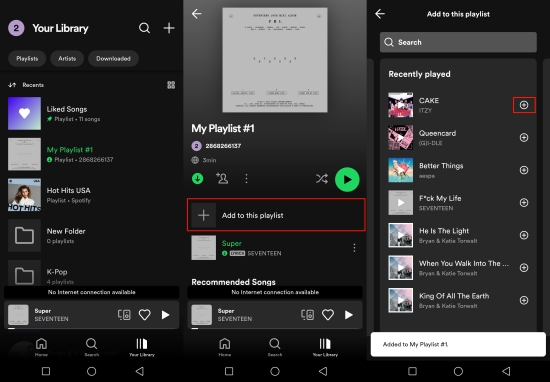
Another tip is to use Spotify's search function to find and add multiple songs to a playlist. By typing in a particular genre or artist, users can quickly find and add multiple songs to their playlist. This is a great way to discover new music and add it to your playlist in one go.
In conclusion, the ability to add multiple songs to a playlist on Spotify is a game-changer for music lovers. With its ease of use and ability to save time, this feature is a must-have for anyone looking to get the most out of their music experience. So why not give it a try today, and see how it can help you to create your perfect playlist?

As you explore the world of Spotify and all its features, you'll find that adding multiple songs to a playlist is just the beginning. With Spotify's discover weekly and release radar features, you'll be able to discover new music and add it to your playlist in no time. So what are you waiting for - start creating your perfect playlist today, and experience the power of Spotify for yourself!
With Spotify constantly evolving and improving, it's an exciting time to be a music lover. New features and updates are being added all the time, and the ability to add multiple songs to a playlist is just one example of how Spotify is giving users more control over their music experience. So whether you're a music newbie or a seasoned Spotify user, there's never been a better time to get started and see what all the fuss is about.