Intel Pentium N3540 Vs Celeron N3050
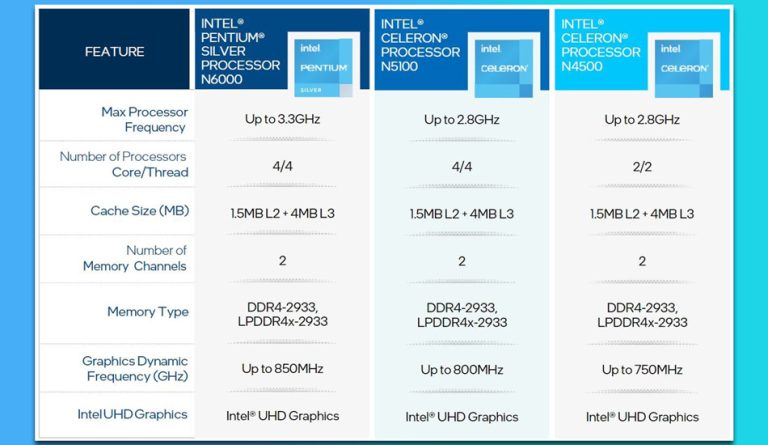
Let’s be honest: nobody buys a laptop with an N3540 or a N3050 inside because they’re chasing dreams of editing 4K video. No, you buy one of these because you saw a “deal” at a big-box store, or because your cousin’s neighbor’s uncle upgraded and gave you his “still works great” machine. You’re not buying raw power; you’re buying a digital paperweight that also happens to browse the internet—very slowly.
These are the chips that live in budget laptops, the kind with plastic chassis that flex when you sneeze. They’re the engine of those $199 back-to-school specials that promise “all-day battery life” but really mean “you’ll take a nap waiting for Windows to update.” So, which one is the less painful choice? It’s like choosing between a rusty bicycle and a skateboard with one bad wheel—you’re getting somewhere, but you’ll feel every crack in the sidewalk.
The Big Showdown: N3540 vs. N3050
The Pentium N3540 is the older, beefier sibling. It has four cores, which sounds impressive until you realize they’re the CPU equivalent of four hamsters running on a wheel. The Celeron N3050? It has just two cores, so you’re down to two hamsters, and one of them is probably napping.
Must Read
In real life, this means the N3540 can open six browser tabs before it starts to sweat, while the N3050 gives up after three and starts typing in a stutter. But here’s the kicker: the N3540 is older, runs hotter, and drains the battery faster. It’s like a middle-aged SUV that gets 12 miles per gallon but can tow a small boat—if the boat is a PDF document.
What You’ll Actually Experience
Imagine you’re trying to stream a cooking show while also, I don’t know, checking your email. On the N3050, the video will buffer, then buffer again, then freeze on a close-up of a whisk. You’ll start nodding along to the chef’s chopping as if it’s a meditative exercise. Meanwhile, the N3540 will play the video, but the fan will sound like a tiny jet engine preparing for takeoff every time you move the mouse.
Opening Microsoft Word is a whole event. On the N3050, you’ll click the icon, go make a cup of tea, and come back to a white screen that slowly fades in. On the N3540, it’s slightly faster, but you’ll still have time to check if the cat is asleep. These chips don’t multitask; they single-task with a lot of heavy breathing.
Let’s talk about playback. YouTube at 720p? Maybe. 1080p? That’s a pipe dream. The N3050 will drop frames like a clumsy waiter dropping plates. The N3540 will show you the video, but you’ll notice the audio is slightly out of sync—a reminder that you’re on borrowed time. It’s like watching a dubbed movie where no one bothered to match the lip movements.
The Battery Life Trade-Off
Here’s where the Celeron N3050 gets a gold star for effort. It sips power like a polite guest at a dinner party. You can get a full day of light browsing, as long as “browsing” means staring at a static page for ten minutes. The Pentium N3540, on the other hand, drinks battery like a thirsty marathon runner. You’ll be hunting for an outlet after two hours of light use, which is fine if you enjoy sitting near the floor in coffee shops.
But don’t let that fool you. The N3050’s efficiency comes at a cost—it feels like the CPU is holding its breath. If you dare open a PDF with images, it’ll think for five seconds, then scroll with the urgency of a sleepy sloth. The N3540 at least has the decency to scroll immediately, even if it screeches like a kettle while doing it.

Which One Should You Choose?
Honestly? If you’re stuck between these two, you’re not choosing a laptop; you’re choosing your frustration flavor. The N3540 gives you more raw power for basic tasks, but you’ll hear every ounce of effort it puts in. The N3050 is quieter and cooler, but it will test your patience in ways that make you question your life choices.
My advice? If you find a laptop with the N3540 for a steal, grab it—just keep a bottle of Advil nearby for the fan noise. If you get the N3050, remember to close all other apps before opening a second one. You’ll be fine, as long as "fine" means accepting that your computer is not a tool for productivity, but a gentle reminder to touch grass every twenty minutes.
In the end, both of these chips are perfect for one thing: making your smartphone feel like a supercomputer. Use them for word docs, basic spreadsheets, and maybe an old game like Minesweeper. For anything else, just step away from the keyboard and go for a walk. Your eyes, ears, and soul will thank you.