How To Track My Cricket Cell Phone
In the golden age of the flip phone, losing your device felt like a minor inconvenience—a trip to the lost-and-found bin at the local diner, perhaps. Today, your smartphone is less a device and more a digital appendage, a silent vault containing your bank accounts, your grandmother’s last voicemail, and a photo of that suspiciously perfect avocado toast you made in 2019. When that appendage goes rogue—slipped between couch cushions or lifted from a cafe table—the panic is visceral, a cold sweat that feels almost primal. For the millions of Cricket Wireless users, the path to locating a lost device is not just a technical procedure; it is a modern-day rescue mission, a digital spelunking expedition into the cloud.
The beauty of Cricket’s tracking ecosystem lies in its deceptive simplicity. While many assume you need a private investigator or a deep knowledge of IMEI codes (those arcane 15-digit serial numbers that feel like incantations), the reality is far more accessible. Cricket leverages the Android Find My Device network and Apple’s Find My app, creating a safety net that is both robust and eerily precise. This isn't just about pinging a location; it’s about understanding the psychology of loss, the archaeology of your daily routines, and the quiet power of remote data control. Whether you are a chronic phone-dropper or a meticulous organizer, mastering this system is the modern equivalent of knowing how to change a flat tire—except the tire contains your entire social life.
The Cartography of Chaos: Why Location Tracking Feels Like Magic (And Sometimes Isn’t)
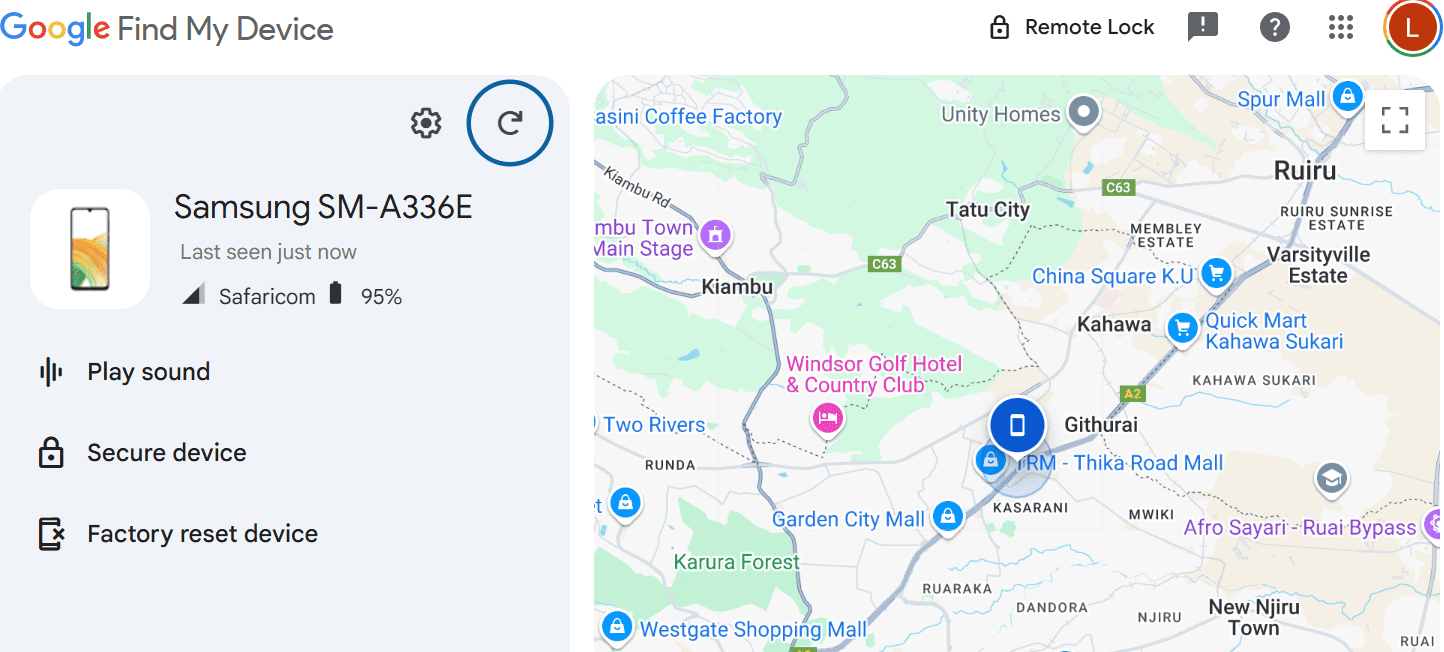
Let’s strip away the user interface and look at the raw mechanics. When you log into Google’s Find My Device with your Cricket-billed Android, you are essentially shouting into the digital void, asking your phone to shout back. The phone, if it’s on and connected to Wi-Fi or cellular data, responds with a burst of GPS coordinates, Wi-Fi triangulation data, and even Bluetooth beacons. This is not a single point of truth; it’s a messy, beautiful soup of metadata. The dark little secret? Your phone’s last location might be up to a minute old, and in that minute, a thief could have run six blocks or hailed a cab. The ‘real-time’ tracking we see in spy movies is a Hollywood fabrication; the real thing requires a bit of patience and a lot of trust in algorithms.
Must Read
But here’s the twist that feels ripped from a tech-noir novel: the history of location tracking is deeply intertwined with the history of advertising. The same infrastructure that lets you find your Cricket phone in a park dumpster was originally refined to serve you hyper-targeted ads for sneakers. This duality means that your phone is constantly broadcasting its presence, even when you think it’s sleeping. When you use the "Ring" feature—which makes your Cricket device scream at full volume for five minutes even on silent—you are weaponizing that broadcast capability. It’s a sonic beacon that taps into your immediate auditory environment, bypassing the need for visual confirmation entirely. The psychological relief of hearing that ring from under a pile of laundry is almost orgasmic, a surge of dopamine that confirms you aren’t losing your mind.
Culturally, we treat phone loss as a personal failing, a moral lapse in responsibility. This is nonsense. The average person checks their phone 96 times a day; with that frequency, entropy is inevitable. The cultural shift we need is to treat tracking as a pre-nuptial agreement with technology. You don’t wait for the divorce to get the lawyer; you set up the tracking before the crisis. Cricket’s integration with carrier-level services also allows for something darker and more useful: the ability to see your phone’s location history for the last 24 hours. This is less about finding a lost item and more about reconstructing a timeline. Did you drop it at the grocery store at 4:32 PM, or did you leave it at your desk at 3:00 PM? The data doesn’t lie, but it also doesn’t judge—it merely presents the coordinates of your chaos.
The Protocol of Recovery: From Couch Cushions to Criminal Deterrence
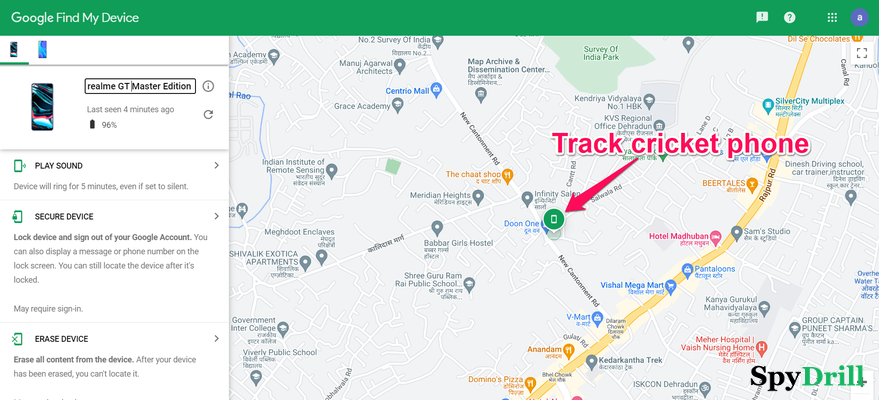
Let’s paint a scenario. You’re at a dimly lit jazz bar in Chicago, the bass thrumming through your chest. You reach for your Cricket Android to check the time, and your pocket is empty. Panic. The first step is not to sprint into the bathroom and start knocking over trash cans. The first step is to borrow a friend's phone, navigate to google.com/android/find, and log in with the Gmail account tied to your device. The interface will show you a map. If your phone is in the bar, you’ll see it pulsing gently. You select the "Play Sound" option. The phone will ring at max volume, even if it’s on silent, for five minutes. In that scenario, the sound will likely come from the stack of coats near the DJ booth—you dropped it while retrieving your scarf. Case closed, fifteen minutes of drama, zero calories burned.
Now, the darker scenario. Your phone is gone, and the location pings to a residential apartment complex across town—somewhere you have never been. This is the moment where the psychological game begins. Do not attempt a vigilante retrieval. The smartest, most legally sound move is to use the "Secure Device" function to lock the screen with a custom message. You can type: "Reward for return. Call this number." This acts as a digital beacon of temptation. Simultaneously, you should log into your Cricket account via a computer and report the device as lost or stolen. This allows Cricket to flag the device's IMEI, rendering it useless on the network—a move that destroys its resale value and incentivizes a potential thief to dump it in a bush. It’s a scorched-earth policy for electronics, and it’s beautifully effective.

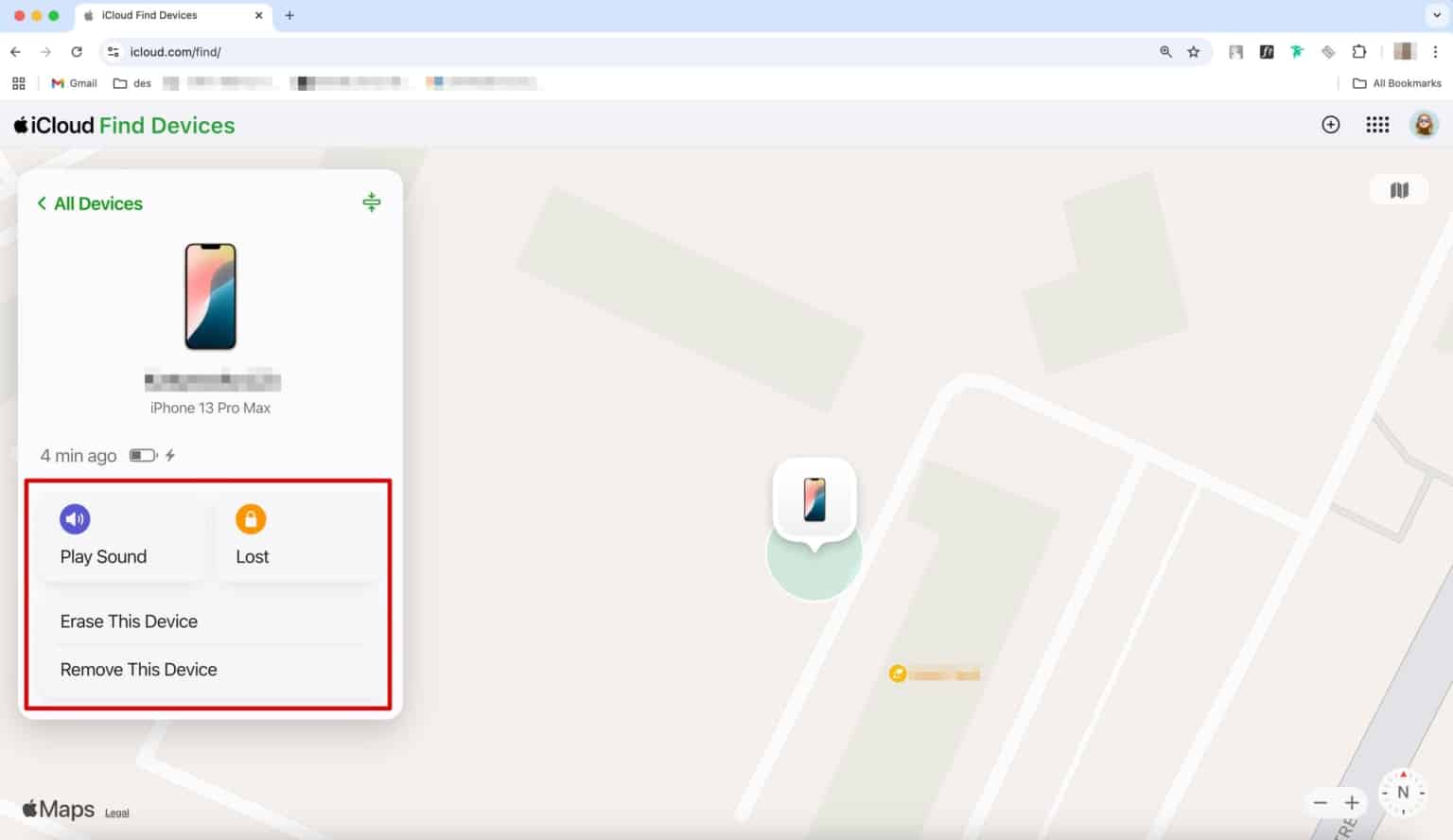
For the Apple ecosystem on Cricket, the process is equally elegant but slightly more theatrical. You open the "Find My" app on a friend’s iPhone or on iCloud.com. The app will show your iPhone’s last known location. If it’s offline, you can enable "Notify When Found," which sends you a push notification the second the device reconnects to any network. The most extreme feature here is "Erase This Device," a nuclear option that wipes your data clean. However, experts will tell you to use this as a last resort. Once erased, you can no longer track it; you lose your digital leash. The actionable takeaway? Geofencing is your friend. Set up a "Home" location in the Find My app. The moment your phone leaves the geofence (like a thief walking out your front door), you get an alert. It’s like having a silent, paranoid guard dog living in your pocket.
Beyond the crisis, tracking is about meticulous post-recovery hygiene. When you get the phone back, do not immediately slide it back into your life. Check the battery usage—has it been draining abnormally fast? That might indicate spyware installed by a malicious actor. Change your critical passwords (banking, email, social media) from a different device. Think of the phone as a contaminated object; it has handled your secrets without your supervision. Finally, invest in a physical tracker like an AirTag or Tile. Attach it to the case or slip it inside the back panel. This redundancy creates a layered defense; if your phone dies completely, the tiny tracker still pings its location via nearby devices. It’s the analog backup for your digital life, ensuring that your Cricket phone is never truly alone in the wilderness.
The Dos, Don’ts, and Dark Alleys: Troubleshooting Your Rescue
Let’s address the glitches. You log into Find My Device, and the map spins endlessly. Your phone is listed as "Offline." This is the digital equivalent of a black box after a plane crash—the data is frozen. This often means the phone’s battery died, or the device was powered off immediately. Here’s a dark, fun fact: stealing a phone and immediately turning it off is the most effective anti-tracking method, and it’s the first thing professional thieves do. They know the GPS stops transmitting. But they can’t stop your phone from displaying the "Last Seen" timestamp. If the phone died in a taxi, you might be able to call the cab company with a specific time and route window. The timestamp is your alibi and your clue.
Another common hiccup is the dreaded "Location unavailable." This happens when the phone is inside a metal Faraday cage (like a car trunk) or in a deep basement. Don’t panic. Instead, use the "Find My" network’s crowd-sourced location feature. Even if your phone isn’t actively connected to a tower, it can bounce a Bluetooth signal off other nearby Android or Apple devices. This creates a constantly updating location grid. This is why sometimes the map shows your phone’s location as inaccurate by 20 feet—it’s estimating based on a stranger’s phone passing by in a bus. It’s spooky, but it’s effective. Always wait 10–15 minutes before giving up; sometimes the phone just needs a moment to sync its location data.
Consider the case of Maria, a freelance photographer who left her Cricket phone on the roof of her car before driving off. The phone slid off at a busy intersection. Using Find My Device, she saw the phone traveling down the highway at 65 mph—a vehicle, not a person. She watched it on a laptop while her boyfriend drove parallel to it. They didn't cause a high-speed chase; they simply noted the final resting spot when the dot stopped moving (a rest stop parking lot). They drove there, and found the screen cracked and face-down in the grass. The phone was still ringing when she called it. The point is: the tracking feature turns you from a victim into a passive observer of your own misfortune. You are dispassionately watching a satellite view of your mistakes, which is both profoundly humbling and incredibly useful for the recovery process.
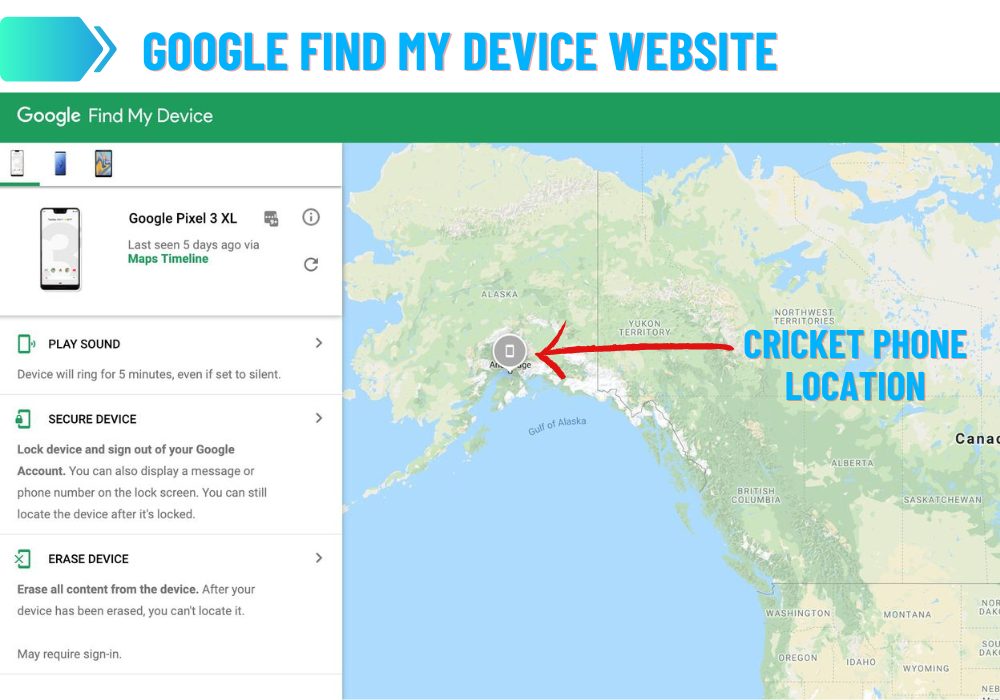
Finally, let’s talk about the contentious subject of “bricking” your phone. If you are 100% certain the phone is gone for good, remotely wiping it is a cathartic act of digital arson. But know this: Cricket has a 30-day return policy on devices, and if you can’t produce the physical phone, you might be on the hook for the full retail price. Before you wipe it, check if you have insurance through Cricket’s "Protect" plan. If you do, the tracking app is your proof of loss. Take screenshots of the last known location and the timestamps. This documentation is crucial for the insurance claim. It’s a bureaucratic layer, but it transforms your panic into a procedural checklist, which is honestly the best medicine for anxiety.
Oracle of the Pocket: Five Pressing Questions, Answered
1. Can I track my Cricket phone if I don’t have a Google or Apple account?
Technically, the primary tracking methods we’ve discussed rely on either a Google account (for Android) or an Apple ID (for iPhone). Without these, the built-in first-party tracking tools are unavailable. However, you have a backup option: Cricket’s own device management portal. While Cricket’s app primarily focuses on bill payments and data usage, you can often find the "Device Locate" feature within the "My Account" section, but this typically only shows the last known cell tower location, which can be accurate to a city block—not a specific couch cushion. This is far less precise than the GPS-based tracking from Google or Apple.
If you find yourself without a linked account, you’re in a tight spot. Your best bet is to check if you have a third-party security app installed, like McAfee or Lookout, which might have its own location pinging service. If you think you might lose your phone in the future, the absolute first thing you should do is log into your Google or Apple account on it right now and enable the location history. This is a digital vaccination; you can’t get the vaccine after you’ve already been exposed to the virus. Without that account tie-in, your phone is essentially a silent brick to you, but a golden ticket to a thief.
2. Will tracking my phone drain its battery significantly?
In the past, constant GPS polling was a battery killer. But modern Android and iOS locations services are aggressively optimized. The location chip in your phone is a low-power GPS receiver that wakes up periodically rather than staying constantly active. The Find My feature doesn't force your GPS to stay on; it uses a combination of Wi-Fi scanning and cell tower triangulation to update your position, which uses markedly less power than the high-accuracy GPS mode used for turn-by-turn navigation. The result is that having "Find My Device" enabled typically consumes less than 1–2% of your battery per day.
The slight battery drain is a negligible price for the security payoff. However, there is a caveat: it’s not the tracking setting that kills your battery; it’s the act of the recovery process. When you are actively viewing the map and making the phone ring, the screen on your other device and the network requests are what drain power. Your lost phone, ironically, might be sipping battery at a standard rate. The real danger is when you leave location services on for all apps, not just the tracking system. Every app from a random flashlight app to a shopping app is pinging your location. For the best battery life and efficient tracking, go into your settings and ensure that only "Find My Device" (and your maps app) have permissions for "Always On" location. All others should be set to "While Using."
3. Can I track my Cricket phone if it’s powered off or the SIM card is removed?
This is the holy grail of phone tracking, and the answer is a nuanced “mostly no.” If the phone is completely powered off, the CPU is dead, the radio is silent, and no GPS is active. There is no power to send a signal. However, both Apple and Google have introduced a clever hardware workaround in recent flagship models. The phone’s Bluetooth and Ultra-Wideband (UWB) chip are designed to continue broadcasting a low-energy beacon even when the phone is off, as long as there is any residual battery power left in the cells. This is the "Offline Finding" mode. Other nearby Apple/Android devices will passively detect this beacon and relay its location to the cloud. It’s a zombie signal—the phone is dead, but it’s still whispering its coordinates.
As for removing the SIM card, that’s a different story. Removing the SIM cuts your phone’s connection to the cellular network, so you lose the cell tower triangulation. But the phone still retains its Wi-Fi chip and its Bluetooth radio. If the thief uses the device to connect to a Wi-Fi network (like a coffee shop or a home network), the phone will ping its location via that network's IP address, and the tracking app can see it. So, a thief removing the SIM can slow down the tracking, but they can’t stop it as long as the device is turned on and connects to any network. The one hard bulletproof solution is to kill the battery completely, which is why you should always use a case that makes the battery non-removable—a feature that has ironically become standard in modern design.
4. Is it legal to track my spouse’s Cricket phone?
Here’s where the smooth, modern lifestyle hits a brick wall of legal reality. Tracking a phone that you own and that is on your account plan is generally legal. If you purchased the phone and pay the bill, you have a claim to that device as property. However, the legality becomes murkier when you track a phone that is used by another person, even if they are your spouse. While it’s technically your property, there are stalking laws and privacy expectations in most jurisdictions. In many states, non-consensual tracking using a hidden GPS device is a criminal offense, regardless of ownership status. The distinction lies in intent; using the tracker to monitor a cheating spouse usually violates the Computer Fraud and Abuse Act and various state privacy statutes.
For family plans, Cricket offers parental control features that allow parents to monitor their minor children's phones—this is legal and widely accepted. But for adults, you must get explicit consent. The ethical rule of thumb is transparency. If you are open about the tracking, telling them “I put a tracker on your phone in case we get separated,” that is a defensible, legal precedent. But if you are covertly installing tracking apps behind their back, you are exposing yourself to significant legal liability. The dark side of this technology is that it turns trust into surveillance. It may feel like a security blanket for you, but it’s a cage for them. Always err on the side of disclosure; a relationship that requires covert tracking is already past the point of technological salvation.
5. What happens to my tracking data after I find my phone?
This is a question that opens the Pandora’s box of digital privacy. The location history that you used to find your phone is technically stored in the cloud—either on Google’s servers or Apple’s iCloud servers. Google, in particular, maintains a "Location History" timeline that can show you every place you’ve been in the last month, down to the specific store you visited. When you recover your phone, this data doesn’t just vanish; it stays on the server as a breadcrumb trail. This is fantastic for looking back at your vacation photos and seeing exactly where you took them, but it’s also a trove of sensitive data for advertisers and law enforcement.
After recovery, you should take control of this data. Go to your Google Account settings and delete specific location entries or turn off Location History entirely. For Apple, you can go to Settings > Privacy > Location Services > System Services > Significant Locations and clear that history. The data isn’t just deleted; it’s overwritten. This is a vital step for digital hygiene. Your phone is a reflection of your habits—the late-night pharmacy runs, the secret visits to a therapist’s office. Leaving that data dangling in the ether is like leaving your journal on a park bench. The convenience of tracking comes at the cost of permanent surveillance of your own life. By actively purging this data post-recovery, you restore the balance of power between you and the machine.
Ultimately, the ability to track your Cricket cell phone is a mirror held up to human nature. We are predisposed to hoard, to protect, and to panic at the thought of losing our digital memory. The tracking app isn’t just a utility; it’s a security blanket for the soul. It taps into our deep-seated need for control in a world that is inherently chaotic. We can’t control the weather, the stock market, or the erratic behavior of our fellow humans, but by God, we will control the location of our pocket-sized supercomputer. This quest for spatial awareness is a modern manifestation of the ancient hunter-gatherer instinct—we are simply tracking a different kind of prey: our own misplaced keys and silent phones.
There is also a poignant sense of self-reflection here. When you look at the map and see the pings of your day—the erratic route you took to work, the 15 minutes you spent in the Target parking lot just sitting in your car, the 2 AM trip to the 7-Eleven—you are seeing the physical manifestation of your subconscious patterns. It’s a passive biography written in longitude and latitude. It reminds us that our lives are not just a series of thoughts, but a series of movements. The tracking app forces us to confront the fact that we are biological creatures that haven’t evolved to fly; we are terrestrial beings, and our digital appendages leave trails.
In the end, whether you find your phone under a pile of unpaid bills or have to watch it drive away on a city bus, the act of tracking is a meditation on attachment. We care so deeply about these glass slabs because they hold our connections to others. The relief you feel upon recovery isn’t about the value of the hardware; it’s about the reunification with your community. So, go check that your location services are on. Update your emergency contact info. And perhaps, just perhaps, consider leaving the phone at home the next time you go for a walk—a radical act of digital liberation that even the best tracking software can’t replicate.