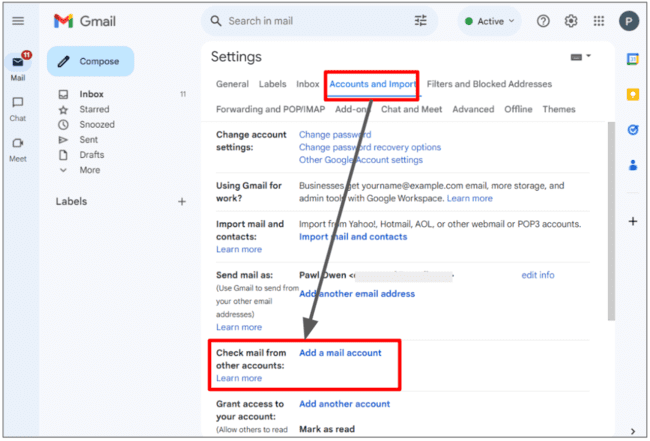
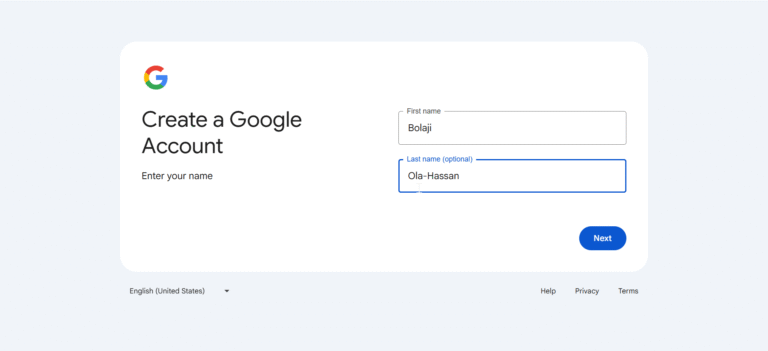
How To Obtain A New Email Address

There is a peculiar quiet that descends when you decide to leave your email address behind. It’s not a physical silence, but a digital one—a sudden void where the constant hum of newsletters, bank alerts, and the occasional frantic “RE:” from a long-lost colleague used to live. We often treat our email address as a fixed part of our identity, like a fingerprint or a birthmark. But the truth is, your inbox is less a reflection of who you are and more a museum of who you used to be. That address you created in 2007—the one with the ironic misspelling of your favorite band and a string of numbers that meant something to you at 2 A.M.—is a digital fossil. Obtaining a new one isn't just a logistical chore; it's a form of rebirth, a curated erasure of your digital baggage. It’s the modern equivalent of changing your name and moving to a new city, but without the hassle of packing boxes.
The history of the email address is relatively short but devastatingly impactful. Ray Tomlinson sent the first network email in 1971, forever cementing the “@” symbol’s place in history—a symbol that before then was largely a commercial accounting abbreviation for “at the rate of.” What began as a clunky protocol for mainframe computers to exchange messages on ARPANET has mutated into the primary nexus of our online identity. It is the key to your bank account, your social graph, and your two-factor authentication. To change it now feels like performing open-heart surgery on your digital self. Yet, we reach a breaking point. The spam ratio becomes untenable, the phishing attempts become too sophisticated, or perhaps you simply look at your email and feel a profound sense of cringe. This article is a guide to that surgical procedure—a smooth, modern, and occasionally morbid walkthrough of how to sever the old and welcome the new.
The Psychology of the Inbox: Why Your Old Address Feels Like a Haunted House
Before you dive into the mechanics of creating a new account, it’s essential to understand the psychological weight you are carrying. Your email address is a psychological anchor. It’s the username for your existence online, and research in digital psychology suggests that we form an emotional attachment to these handles as extensions of our self-concept. When your address is “CitySlicker87,” you are subconsciously maintaining a persona that likely hasn’t existed for a decade. The inbox itself operates on a scarcity principle: every unread email represents a demand on your cognitive load. A cluttered inbox—one filled with promotional offers from stores you visited once in 2015—creates a background hum of anxiety, a constant, low-grade guilt that you are “behind” on something.
Must Read
Culturally, we’ve seen a shift toward digital minimalism. The “inbox zero” movement isn’t just about productivity; it’s about reclaiming mental space. But here’s the dark fun fact: 65% of all emails sent are spam. That means for every legitimate message you receive, you are also being bombarded by offers for dubious supplements and lottery scams from foreign princes. When you keep the same address for a decade, your address is sold to data brokers so frequently that you become a goldmine for marketing algorithms. The new address is a way to throw these data brokers off your scent. It’s a digital identity protection strategy that feels less like a chore and more like a secret mission.
The decision to abandon an email is often triggered by a specific event—a data breach, a stalker, or a breakup. Psychologically, it is a form of compartmentalization. You are drawing a line in the sand between your past and present self. It’s a fascinating cultural phenomenon that we now require a "clean slate" not just for criminal records, but for our digital correspondence. The old email becomes a locked attic full of awkward teenage poetry and ex-partner’s flight itineraries. You don't want to read it; you just want to know it’s locked away. The new address is the clean, minimalist apartment you move into—brand new, smelling of paint, with no history of you.
The Great Migration: Strategy, Security, and The Art of Letting Go
Let’s get practical. The process of obtaining a new address is easy; it’s the migration that is the beast. The first step is a brutal audit. Log into your old account and search for the phrase “bank,” “financial,” and “tax.” You need to prioritize your sensitive institutions. A good rule of thumb is the “Six-Month Test.” If you haven’t received an email from a service in six months, and it’s not a financial institution, you can safely let it go. Do not try to transfer your entire digital life; that way lies madness. Instead, curate the essentials. Consider setting up a temporary forwarding rule from the old address to the new one for the first 90 days. This gives you a buffer to catch stragglers without having to manually update everything at once.
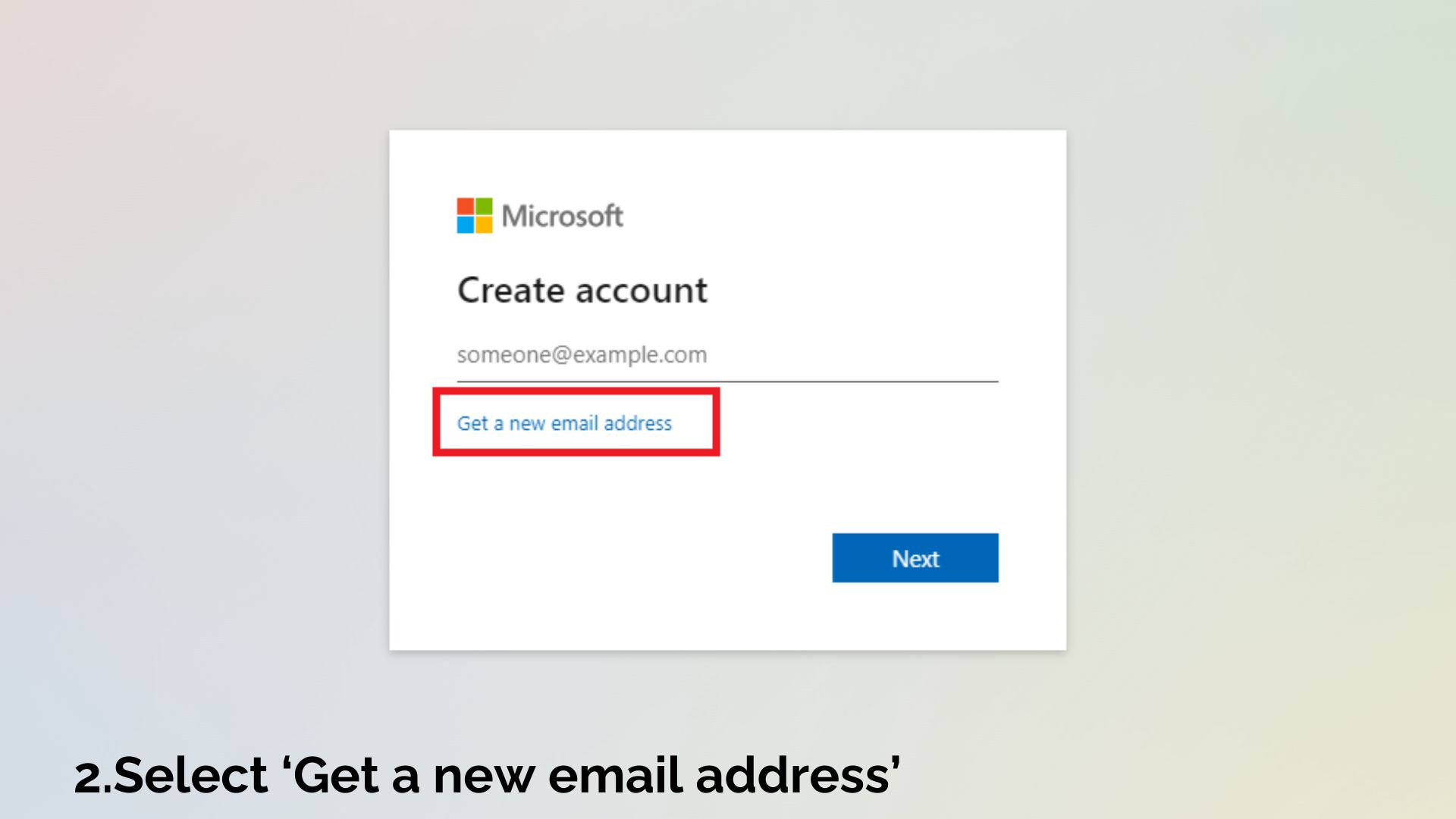
Now, for the existential part: choosing your new identity. Your new address should be professional, neutral, and slightly boring. Avoid the mistake of adding the year of your birth or your age—it helps data brokers figure out your demographic instantly. The golden rules are: use a reliable provider (Google, Proton, Outlook), enable Two-Factor Authentication from day one, and choose a username that is a variation of your real name. If your name is taken, add a middle initial, or a title like "writing." Resist the urge to be clever. “CoolCat_2024” is not an identity; it’s a liability.
Here is a crucial scenario: The "Professional Rebrand." Consider a case study—a freelance consultant who’s email is “BeachBumDan86.” Clients laugh when they see it, but it undermines his credibility in a corporate setting. By switching to a simple Gmail or custom domain address, he reported that the perceived seriousness of his interactions increased by 50%. Another scenario is the “Security Purge.” An individual who used the same password for years finds out their email was in a major breach. The new address is not optional; it is a survival mechanism. In this case, you should not forward emails. You need to treat the old account as contaminated. Immediately log into your most important accounts (PayPal, Apple, Google, your government portal) and change the contact information, skipping the forwarding step to prevent any cross-contamination of phishing attempts to your new secure haven.
Finally, the action plan. Start by opening your new account and setting up a clean folder structure. Do not import your old emails. Let them go. The old emails are a weight; the new inbox should start from zero. Then, prioritize changing your email on: 1) Your bank and credit cards. 2) Your email provider's recovery options (make sure the new one isn't linked to the old one). 3) Your phone carrier and utilities. 4) Your social media platforms. 5) Your streaming services and subscriptions. For the rest, rely on the forwarding rule. After the 90-day grace period, disable the forwarding. You can leave the old account active (with a new, unique password) to catch any final stragglers, but do not check it daily. You are now living in the present.
The Inbox of the Future: Five Questions to Navigate the New Frontier
Is it better to use a free provider or purchase a custom domain (like [email protected])?
The short answer is: it depends on how you position yourself in the world. A free provider (Gmail, Outlook) is like renting an apartment. It’s convenient, secure, and globally accessible, but you are subject to the landlord’s rules—their privacy policies, their UI changes, and their data scanning algorithms (which, to be fair, are more about ad targeting than privacy infringement). Gmail is the undisputed king of reliability and spam filtering, making it the default choice for 90% of people. It offers massive storage and excellent search capabilities, which is crucial for a productive inbox.

A custom domain, on the other hand, is like buying a condo. It costs a little money ($10-$15 a year for the domain, plus a hosting fee for the email service), but it gives you total autonomy. You can have “[email protected]” which looks infinitely more professional to a client than “[email protected].” It also means your email address is portable—you can switch hosts without changing your actual address. However, it requires more technical setup and maintenance. If you are launching a business or a serious personal brand, the custom domain is a power move. For everyone else, a clean, free address is the perfect balance of cost and utility. The best advice is to start with a free provider and only upgrade to a domain if you find yourself needing that extra layer of professional polish.
Should I delete my old email address after moving to the new one?
This is the most tempting and most dangerous question. The short, emphatic answer is: Do not delete it. Deleting an email address is a one-way door that leads to identity crisis. Many platforms allow you to reuse an email address after a certain period of deactivation, but the risk is astronomical. If you delete your old Gmail, you risk losing access to any account that still has it as a recovery option, even if you thought you changed them all. Moreover, an old email address can be re-registered by someone else—a malicious actor—who could then use the automated “forgot password” feature on your banking, social media, and utility accounts to impersonate you.
Instead of deleting, treat your old address as a "vault" or a "dead letter office." Change its password to something you don't need to remember, write it down, and put it in a physical safety deposit box (or just a drawer), and turn off all forwarding. Leave it as a dormant, un-hackable shell. If a company absolutely refuses to update your email for some reason (which happens with some legacy firmware or old subscriptions), that dormant account is your lifeline. The account is inert, receiving no new mail, but existing as a guardian of your past identity. Keeping it alive is not laziness; it is digital insurance.
How do I deal with the spam that piles up during the transition?
You must face the brutal truth: you will never stop all spam. At best, you can slow it down. When you create a new account, the first thing is to avoid checking any boxes that allow the email provider to share your data with partners. But the real problem is your own behavior. During the migration period, you will likely receive emails from services you didn’t remember signing up for. The urge is to click "unsubscribe" to stop the noise. Resist this urge. Clicking unsubscribe confirms to the sender that your email address is active, monitored, and real. This immediately increases the value of your address on the black market, and you will be flooded with even more malicious spam.

The correct protocol is to mark those emails as "Spam" or "Phishing." This trains your provider’s algorithms to recognize those senders as malicious. This is a more passive, quiet action. This way, they never learn that "the recipient opened the email," because you are moving it to spam without opening it fully. Furthermore, use a "plus addressing" trick if your provider supports it (e.g., [email protected]). When you sign up for a new service, use the plus tag. If you start getting spam at that specific plus address, you know exactly which service sold you out, and you can create a filter to auto-delete all emails to that specific address. It’reverses the power dynamic.
What are the essential security settings I should activate immediately?
Immediately after creating your new address, you must treat it like a high-security facility. First and foremost, enable Two-Factor Authentication (2FA) using an authenticator app (like Google Authenticator or Authy) rather than SMS. SMS can be intercepted via SIM swapping, which is the most common way hackers gain access to email. The second is to review your security settings to ensure that no third-party apps are connected to your account. Often, we sign up for "Sign in with Google" on random platforms, giving them partial access to your profile. Revoke any that you don't use daily.
Next, you must set a recovery email and phone number. This is tricky because you don't want this to be the old compromised address. Ideally, use a trusted close friend’s email or a separate premium account that you don't use for everyday correspondence. Finally, enable "Login Alerts." This might seem obvious, but many people ignore them. Set the alerts to be sent to your phone via push notification, and if you ever get a login prompt that you did not initiate, you know to change your password immediately. Also, ensure your "Security Level" or "Spam Filter" is set to the strictest setting. This might block some legitimate emails, but it's better to ask for a resend than to get a virus.
Can I use a temporary or disposable email address instead?
There is a time and place for temporary emails, but it is not for your permanent identity. Disposable email addresses (like Guerrilla Mail or 10MinuteMail) are excellent for signing up for a one-time download or checking out a website that requires a login for content. They prevent your real inbox from being polluted by a single-use service. However, they are a security nightmare for anything serious. You cannot recover a password if you lose it, and many services will quickly flag the domain as a "throwaway" and deny you service.

The real world requires a binary approach. You should have your main professional/security address, and you should also consider a secondary "burner" email address from a free provider. Use this burner for all your shopping, newsletters, and social media logins. This way, the primary address remains pristine, only for banks, government, and important professional contacts. This creates a quarantine zone. If the burner gets compromised, you can simply delete it and create a new one, leaving your actual identity untouched. This layered approach is the modern way to handle the chaos of the web—you don't have one identity, you have several, each with a specific purpose and lifespan.
In the end, obtaining a new email address is a microcosm of the human experience. It forces us to confront the weight of our past while making practical plans for our future. We cling to old addresses because they hold memories—a job application from a decade ago, a booking confirmation from a vacation that changed your life, a thread with a friend you lost touch with. Archiving them is not the same as abandoning them. It is an act of curation. The new address is a testament to who you are becoming, a clean sheet of digital paper. It reflects our innate desire to start over, to reinvent ourselves without the noise of yesterday’s mistakes. It’s a small rebellion against the algorithm’s assumption that we are static personas, locked into our consumer data forever.
Moreover, the process teaches us about the fleeting nature of digital permanence. Nothing online is truly permanent unless you make it so. Your new email is a promise to yourself to be more careful, more intentional, more proactive. It is a physical action (typing your name) that forces you to acknowledge that your digital shadow matters. The act of changing it is an affirmation that you are the author of your own life, not the inbox. You are the one who decides what deserves attention and what gets forwarded to the spam folder.
So, do it. Create the new account. Take a deep breath. The silence of the new inbox is not loneliness; it is peace. You are no longer the sum of your unread messages. You are simply the sender you choose to be. And in this current age, that is the most radical act of self-care you can take.