
How To Enter Latitude And Longitude

Let’s be honest—staring at a string of numbers like 40.7128° N, 74.0060° W feels less like navigation and more like trying to decode a secret alien message. You’re pretty sure it’s important, but your brain just wants to type “pizza near me” and call it a day. That’s totally fair. However, learning to enter latitude and longitude is like getting the cheat code for the entire planet—it works when every friendly voice in your GPS has given up on you.
First, let’s break the ice (and the coordinates)
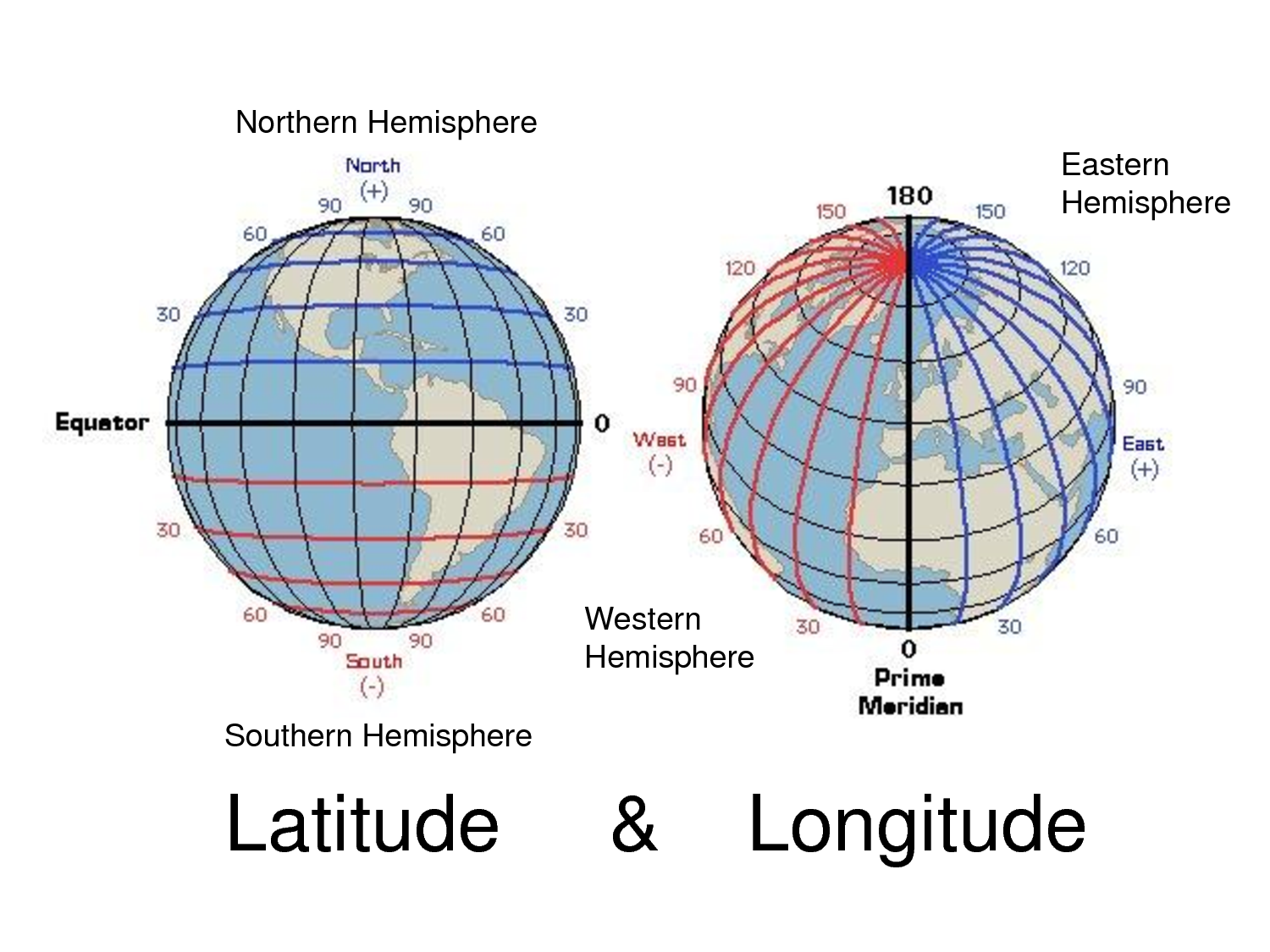
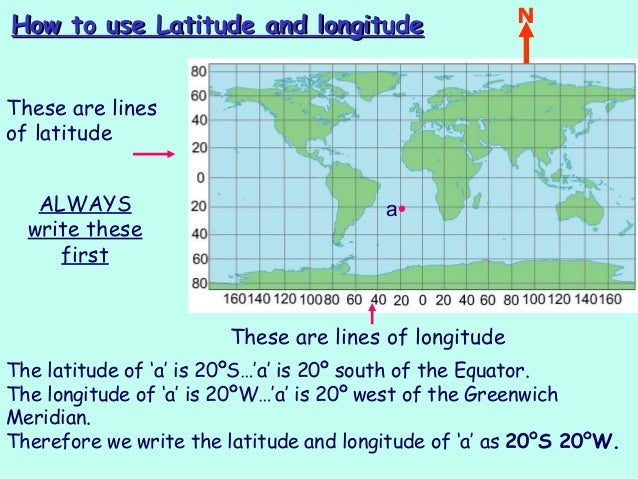
Think of latitude as the horizontal stripes on your pajama pants—they run east to west. Longitude is the vertical seam that runs from the top of your head to your toes, north to south. Simple, right? Now, the trick is that these numbers aren’t just random digits; they’re a precise address for a spot on Earth, usually given in degrees, minutes, and seconds (like 41° 24' 12.2"N), or as a decimal (like 41.40338).
For everyday folks, the decimal form is your best friend. It’s shorter, easier to type, and doesn’t require you to hunt for tiny little quote marks that look like apostrophes. And trust me, if you’ve ever tried to find the degree symbol on a phone keyboard, you know it’s like searching for a specific piece of lint in your pocket—technically there, but taking way too long to find.
Must Read
Where do you even type these numbers?
So, you’ve got a coordinate from a friend who swears they’ve found the ultimate secret beach. Your first instinct? Probably to scream at your phone. Don’t. The fix is usually just a few taps away. In Google Maps or Apple Maps, simply type the coordinate exactly as you received it—with the comma and the N/S/E/W letters—into the search bar. Hit enter, and boom, you’re looking at the spot from space.
It’s like magic, but with fewer rabbits and more blue dots. The key is to not add spaces where they don’t belong, or the map might throw a tiny tantrum and search for a city in another country. Always keep the format clean: 40.7128, -74.0060. The negative sign just means West or South, so don’t be scared of the minus—it’s not a mistake.

When you’re actually in the wild (or the parking lot)
Here’s where it gets real. You’re halfway up a mountain, your data signal is one bar of “maybe,” and you need to punch in coordinates. Do not panic and start typing into your calculator app. We’ve all been there, staring at a tiny screen with “0.000001” and wondering if you’re supposed to convert it to a tent pitch.
Instead, open any navigation app that allows “coordinates input.” In Google Maps, you can also just tap and hold on a spot to drop a pin, then edit the pin’s coordinates. But for entering a new one, the search bar is your friend. Just type the numbers, and if you hear a little “ping,” you’ve done it right. If you hear angry beeping, check for a stray period.

Common screw-ups that make you feel like a GPS clown
We all have that moment where we mix up latitude and longitude, which is the cartography equivalent of putting ketchup on a hot dog when someone’s watching from Chicago. Just remember: Latitude is flat (like a hat), and longitude is long (like a pool noodle). If you enter them backward, you’ll end up in a random field in Kansas instead of that beach in Mexico. Not that there’s anything wrong with Kansas, but it’s not the beach.
Another classic blunder? Forgetting to include the minus sign for western longitudes. If you’re on the U.S. West Coast, your longitude is negative. If you drop the minus, you’ll be sent to a spot in China or the middle of the Indian Ocean, depending on the number. Suddenly, your “quick hike” turns into an international incident.

Why bother when Siri exists?
Well, Siri is great until she decides that “go to the lake” means “drive to a golf course pond.” Coordinates are precise to the meter, which is fantastic for when your friend says, “Meet me at the spot where we lost the frisbee in 2019.” No vague names, no “left at the big tree.” Just pure, raw data—like a secret handshake for explorers.
Plus, there’s a certain bragging right. When you whip out your phone and punch in a long string of numbers without checking a manual, you look like a cartography wizard. People will nod in awe, and you’ll quietly smile, because you know it took you three tries and a YouTube video to get here. And that’s the beauty of it—once you get the hang of it, you’ll never get lost again. Well, you’ll still get lost, but now you’ll have a much cooler way to explain exactly where you are when you call for help.

:max_bytes(150000):strip_icc()/Latitude-and-Longitude-58b9d1f35f9b58af5ca889f1.jpg)
