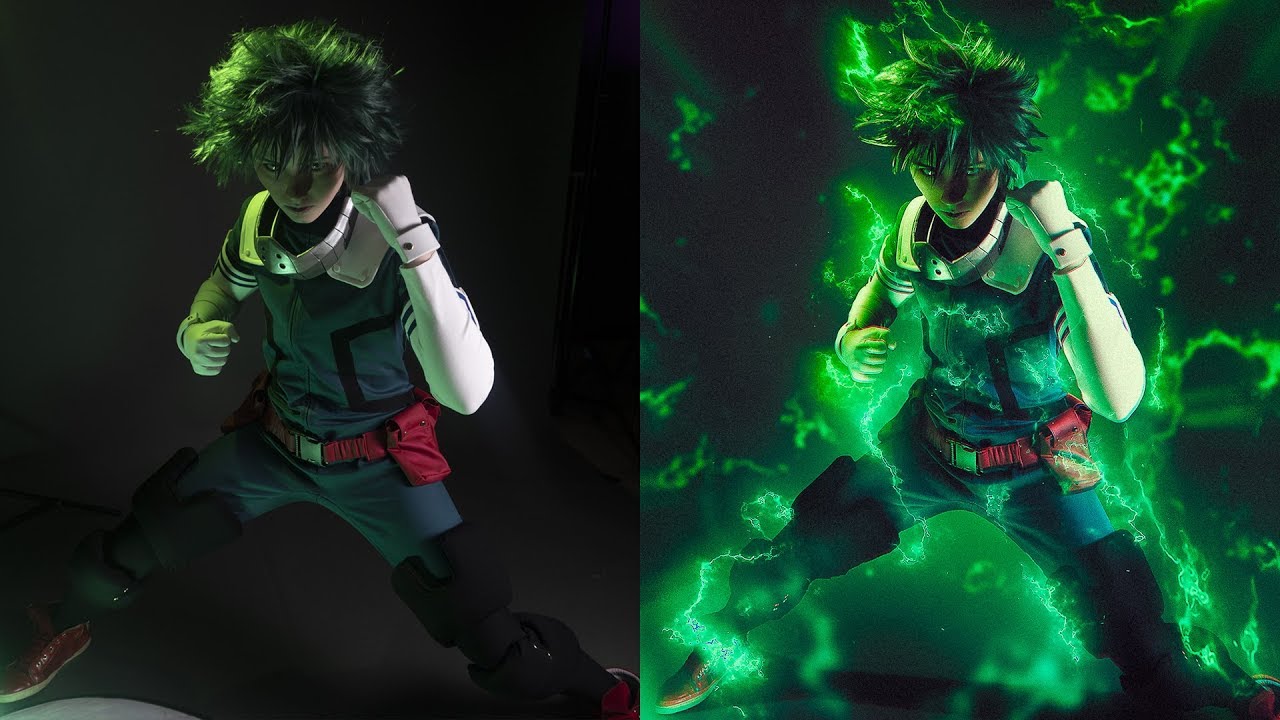
How To Edit Cosplay Photos On Phone

Why Your Phone Is a Cosplay Photoshoot Powerhouse
You’ve spent weeks crafting that armor or sewing that gown. Now, your phone is the only camera you have, and that’s totally fine. Modern phones shoot stunning photos, but the real magic happens in the editing apps right in your pocket.
Editing on the go isn’t just about fixing mistakes—it’s about transforming your costume into a living piece of art. You can add dramatic fog, swap backgrounds, or make your prop glow like it’s powered by magic. Best of all, you can do this at a convention, in a hotel room, or even on the train home.
Step One: The Right Apps Are Your Sewing Kit
You don’t need a desktop computer for pro results. Download Snapseed for precision color and exposure, and PicsArt for creative overlays and effects. For removing stray convention-goers, TouchRetouch is a tiny miracle worker.
Must Read
These apps are free or cheap, and they pack serious power. Think of them as your digital needle and thread—basic but essential.
Before you start, remember: the best edit hides itself. Your goal is to enhance, not to make it look like a plastic filter exploded.
Step Two: Fix the Basics First, Then Get Fancy
Open your photo in Snapseed. Start by cropping out distractions and straightening the horizon—nobody wants a tilted castle wall. Then, boost “Ambience” to bring out the fabric details and metallic sheen of your costume.
Adjust “Highlights” and “Shadows” so your face is bright but your cape still has deep, dramatic folds. Finally, raise the “Saturation” just a notch—your wig’s color should pop, not scream.

If your skin looks orange or your blue dress turned teal, use the white balance tool to fix that fast.
Step Three: Remove the Chaos (Hello, Convention Crowds)
Open TouchRetouch and zoom in on any unwanted people, bags, or trash cans in the background. Use the “Object Removal” brush and slowly swipe over the distraction. Wait a few seconds, and poof—it’s gone.
For larger areas, like a whole crowd behind you, use PicsArt’s “Clone” tool to copy clean wall or floor texture over them. Work slowly, and keep the edits natural. This is the difference between “wow, great photo” and “wow, great photoshop.”

Step Four: Add Drama With Light and Fog
Now the fun part. In PicsArt, go to “Effects” and search for “Light Leaks” or “Rain.” These overlays add a magical glow or a cyberpunk mist without looking cheesy. Make sure to lower the opacity to around 30% so your costume still shines.
For a night-scene hero shot, add a faint blue or purple gradient overlay. Then, use the “Dodge” tool to brighten your eyes and the edge of your weapon—it will look like it’s catching moonlight.
A quick trick: double-tap your finger on the screen to zoom in while painting effects. Precision beats speed every single time.
Step Five: Sharpen and Save the Right Way
When you’re done, use Snapseed’s “Details” tool to add a tiny bit of sharpening—but only to the eyes, zippers, and edge lines. Never sharpen the whole photo, or skin will look crunchy.

Now, export at the highest resolution possible. Most apps offer “Save” vs. “Export High Quality.” Choose the latter. Your hard work deserves every pixel.
If you plan to post, save a copy for social media (slightly downscaled) and keep the original for printing. Trust me, you’ll want a print of that epic pose.
Bonus: Make a Quick Before/After
People love transformation posts. In PicsArt, create a collage with the original on the left and your edited version on the right. Add a simple caption like “From con floor to fantasy realm.” This is the best way to show off your editing skills and your costume craft.

Even a simple side-by-side on your story will get tons of likes. And those likes? They’re fuel for your next build.
Your Phone Is All You Need
Stop waiting for that fancy camera or a friend with Photoshop. Your phone can do 90% of professional editing if you understand contrast, color, and cleanup. Start with these steps, and in one afternoon, you’ll make your cosplay look like a movie still.
Practice on every photo you take—even blurry ones can be saved with a dramatic black-and-white edit. The only limit is your patience and your battery life. Now go edit, have fun, and show the world your masterpiece.