How To Connect Headphones To Android Tv

Connecting headphones to an Android TV is a great way to enhance your viewing experience, whether you're watching your favorite show or playing a game. With the ability to connect headphones, you can immerse yourself in the action without disturbing others around you. This is especially useful if you live with others or like to watch TV late at night.
The purpose of connecting headphones to an Android TV is to provide a more personalized and immersive experience. By using headphones, you can block out external distractions and focus on the audio, making it feel more engaging and interactive. This is particularly beneficial for gaming and movies, where good sound quality can make a big difference.
Benefits of Connecting Headphones
One of the main benefits of connecting headphones to an Android TV is the ability to enjoy high-quality audio without disturbing others. This is especially useful if you have a large family or live in a shared household, where it can be difficult to find quiet time. By using headphones, you can watch your favorite shows or play games without worrying about disturbing others.
Must Read
Another benefit of connecting headphones to an Android TV is the ability to enhance your gaming experience. Many games are designed with 3D audio in mind, which can be fully appreciated when using headphones. This can make the gaming experience feel more realistic and engaging, with the ability to pinpoint the source of sounds and fully immerse yourself in the game.
Connecting headphones to an Android TV is also a great way to improve your overall viewing experience. By blocking out external distractions and focusing on the audio, you can become more engaged in what you're watching and enjoy it more. This is particularly beneficial for movies and TV shows, where good sound quality can make a big difference in the overall experience.

As
Android TVcontinues to evolve, it's likely that we'll see even more innovative ways to connect headphones and enhance the viewing experience. With the rise of virtual reality and augmented reality, it's likely that headphones will play an even bigger role in the future of entertainment. By staying ahead of the curve and learning how to connect headphones to an Android TV, you can ensure that you're always ready to take advantage of the latest technology.
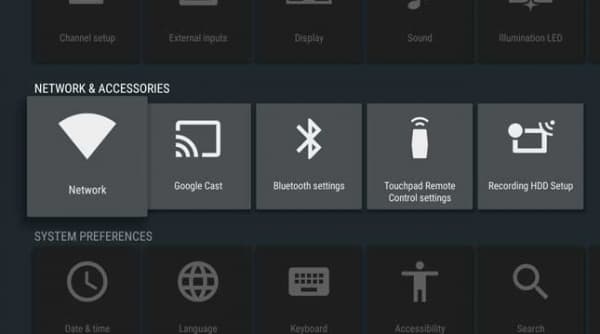
To connect headphones to an Android TV, you'll need to use a Bluetooth connection or a wired connection. Most Android TV devices support Bluetooth, which allows you to connect your headphones wirelessly. This is a convenient option, as it eliminates the need for cables and makes it easy to move around while watching TV or playing games.

If you prefer a wired connection, you can use a 3.5mm audio cable to connect your headphones to the Android TV. This is a good option if you don't have Bluetooth headphones or prefer a more stable connection. Either way, connecting headphones to an Android TV is a simple process that can be completed in just a few steps.
Once you've connected your headphones to the Android TV, you can start enjoying your favorite shows and games with high-quality audio. You can also use the audio settings on your Android TV to customize the sound and get the most out of your headphones. This can include adjusting the volume, equalizer, and other settings to suit your preferences.

Overall, connecting headphones to an Android TV is a great way to enhance your viewing experience and enjoy high-quality audio. With the ability to connect wirelessly or using a wired connection, it's easy to get started and start enjoying your favorite shows and games with immersive sound. Whether you're a gamer, movie buff, or just someone who loves to watch TV, connecting headphones to an Android TV is a great way to take your viewing experience to the next level.
By following these simple steps and using the right equipment, you can connect your headphones to an Android TV and start enjoying high-quality audio today. With the latest technology and innovative features, Android TV is the perfect platform for anyone who loves to watch TV or play games. So why wait? Connect your headphones and start experiencing the ultimate in home entertainment.
In conclusion, connecting headphones to an Android TV is a simple and effective way to enhance your viewing experience and enjoy high-quality audio. With the ability to connect wirelessly or using a wired connection, it's easy to get started and start enjoying your favorite shows and games with immersive sound. So if you haven't already, give it a try and discover a whole new world of entertainment possibilities.