How To Connect A Vpn To A Smart Tv
There is a quiet, almost conspiratorial thrill in the act of unlocking the full potential of your living room screen. For years, we treated our Smart TVs like glamorous, wall-mounted browsers that were permanently stuck in the slow lane—perfect for Netflix, but utterly useless for anything else. We’d squint at geo-blocked content, curse at regional sports blackouts, and accept our fate as digital peasants. Then came the VPN. Once relegated to the shadowy corners of torrent forums and the paranoid IT departments of the 2000s, the Virtual Private Network has evolved into the modern world’s digital passport. Today, it is not about hiding; it is about choosing. It is the difference between watching what the algorithm decides you can see, and watching what you want to see.
Connecting a VPN to a Smart TV feels like it should be a plug-and-play miracle, but the reality is a labyrinth of operating systems, app stores, and proprietary firmware. Samsung’s Tizen, LG’s webOS, and Google’s Android TV are walled gardens that treat third-party security software with the same suspicion a medieval castle treats a battering ram. Yet, the pursuit is worth it. Why? Because the modern streaming giants have become masters of digital apartheid, slicing the globe into content zones. The BBC iPlayer in London is a different beast than the one in New York. And our desire to wander, digitally, is a fundamentally human trait—we are explorers trapped in a rectangular box, and a VPN is our compass. This guide is not a technical manual; it is a lifestyle intervention.
The Great Illusion of the “Smart” in Smart TV
Let’s debunk the biggest myth of the modern living room: that your Smart TV is actually smart enough to protect you. Most televisions run on severely stripped-down versions of operating systems, bereft of the robust security patches you get on your phone. They are, technically, glorified monitors with a browser that hasn’t been updated since the Obama administration. When you connect directly to your ISP without a VPN, your TV’s DNS requests—the digital breadcrumbs of what you watch—are laid bare for your internet provider to log, sell, or throttle. When you stream a 4K film, you are essentially handing your data to a corporate spy agency in exchange for pixels.
Must Read
There is a dark, delicious irony in the fact that the most expensive screen in your house is also the most vulnerable. While your laptop gets a firewall and encrypted DNS, your TV sits there, naked on the network, broadcasting its digital soul. The psychological shift here is profound. Once you realize that your TV is watching you back—tracking viewing habits to sell to advertisers, injecting personalized ads into your menus—the act of connecting a VPN becomes less about accessing foreign content and more about reclaiming your domestic sovereignty. It is a power move. You are saying, “I see you, ad-platform. But you cannot see me.”
Culturally, the Smart TV has become the modern hearth, but unlike a fire, it does not warm; it extracts. We have traded privacy for convenience so willingly that we forget the alternative exists. A VPN is the antidote to this passive surrender. It is the digital equivalent of drawing the curtains in a glass house. When you route your TV’s traffic through an encrypted tunnel, you stop being a spectator in the data economy and become an anonymous ghost in the machine. It is a quiet rebellion, performed in pajamas, with a remote in hand.
The Three Roads to Freedom: From Router to App
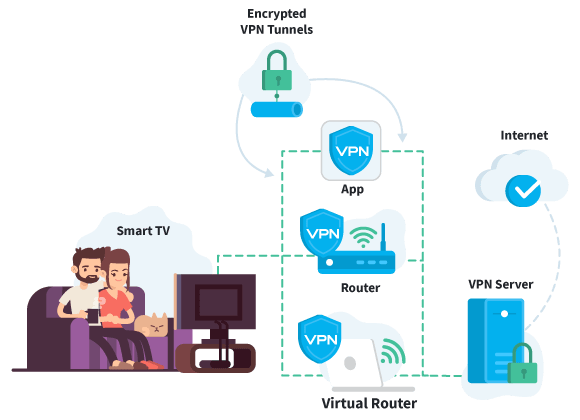
Let us begin with the most robust, if slightly intimidating, path: the router-level connection. This is the "master key" approach. By installing a VPN client directly onto your home router, you create a virtual bubble of encrypted traffic that covers every device on the network—your TV, your smart fridge, your roommate’s laptop, the thermostat that spies on you. The beauty here is simplicity. Your TV remains blissfully unaware that it is being protected; it just sees the internet as it should be. The downside is that you must update the router’s firmware, which often feels like performing open-heart surgery on a toaster. You also risk slowing down your Wi-Fi if your router’s processor is as old as a flip phone. However, the payoff is absolute: unlimited device coverage, zero per-app configuration, and a smug sense of superiority that lasts for months.
The second path, and the one most people actually take, is the native app. For those fortunate enough to own an Android TV or a Google TV (like the Chromecast with Google TV), the solution is elegant—you simply download a VPN application straight from the Play Store. Giants like NordVPN, ExpressVPN, and Surfshark offer polished, TV-optimized interfaces that are designed for the ten-foot view from your couch. You log in, press the big "Connect" button, and voilà. However, this is where the plot twists. For Samsung’s Tizen and LG’s webOS, the app selection is abysmal; it is a digital wasteland of abandoned services and outdated clients. If you own a non-Android TV, the app route is often a dead end.
This brings us to the third, most pragmatic workaround: the virtual router or HDMI sharing. This is the MacGyver approach for the modern age. You take a spare laptop or a mini-PC, connect it to your TV via HDMI, and then enable "Mobile Hotspot" or "Internet Sharing" on that device. You connect your VPN on the laptop, and then you broadcast a new Wi-Fi network from that laptop. Your Smart TV connects to that new network, and thus, all its traffic flows through the VPN. It is a little clunky, requires a dedicated device, and eats up some power, but it works universally. Alternatively, you can use a VPN-enabled media streamer (like an Apple TV or Amazon Fire TV Stick) and use that instead of your TV’s native apps. The TV becomes a dumb monitor, and the streamer becomes your smart brain. It is the ultimate workaround for stubborn hardware.
When approaching this task, remember that your purchase decision matters. Do not buy a cheap, mystery-brand VPN that promises the world but sells your logs to the highest bidder. Look for WireGuard protocol support—it is the modern, fast, and secure standard that makes the whole experience feel silky smooth. Also, be aware of the "Smart DNS" alternative, which is a lightweight cousin of the VPN. Smart DNS only reroutes the metadata of your streaming requests, not the entire data stream. It is faster for bypassing geo-blocks on specific apps, but it offers zero encryption for privacy. If you care about both—privacy and access—a full VPN is non-negotiable.
FAQs: Your Burning Questions, Answered
1. Can I install a VPN directly on my Samsung or LG Smart TV?
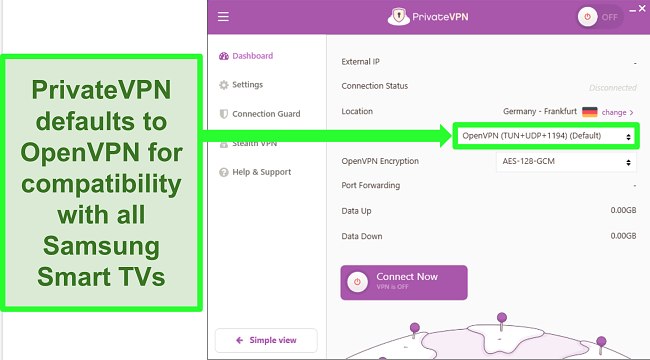
In most cases, the answer is a frustrating "no," at least not officially. Samsung’s Tizen and LG’s webOS do not have native VPN clients available in their app stores. For years, both companies have shown a dismissive indifference to user privacy, likely due to their own advertising and data-collection agreements. You will not find NordVPN or ExpressVPN available for direct download on these platforms. The firmware simply does not allow for the necessary system-level permissions to route traffic through a virtual adapter.

However, you are not entirely helpless. You can use the "MediaStreamer" or "Smart DNS" features offered by many premium VPN providers. These services give you a specific IP address to manually input into your TV’s network settings. This allows the TV to access geo-blocked content without a full encrypted tunnel, but it leaves your browsing data exposed. For full encryption, you must either configure the VPN on your router or rely on an external streaming device. If you want the actual on-screen VPN app, check the specs before you buy—only Android TVs and Google TVs offer that luxury.
2. Will a VPN slow down my 4K streaming speed?
The short answer is: yes, inevitably, but it should be imperceptible if you do it right. Every byte of data you send through a VPN has to travel to a different server, get encrypted, and then be sent back to you. This adds latency and creates a small overhead. However, modern protocols like WireGuard are incredibly efficient, often adding less than 5% overhead. If you have a decent internet connection (50 Mbps or higher), you will not notice the difference during a 4K stream, which typically requires around 25 Mbps.
The bigger issue is server location. If you connect to a VPN server on the other side of the planet to watch a show, your data is taking a massive detour, which increases ping and reduces throughput. The golden rule is to always connect to a server close to your physical location but still in the desired country. For example, if you are in New York and want UK content, connect to a server in London, not Singapore. Also, ensure your VPN provider explicitly supports high-bandwidth streaming and has dedicated servers for Netflix or other platforms. Using a congested server during peak hours will turn your crisp 4K stream into a pixelated slideshow.
3. Is it legal to use a VPN on my Smart TV?
Using a VPN is perfectly legal in the vast majority of the world, including the United States, Canada, the UK, and most of Europe. It is a standard privacy tool. You are legally allowed to encrypt your traffic. However, the legality becomes murky when you use a VPN to violate a streaming service’s Terms of Service (ToS). Netflix, for example, does not allow the use of proxies to bypass regional libraries. While this is a violation of their contract, it is a civil issue, not a criminal one. You will not go to jail, but the platform can terminate your account if they detect it.

In countries with strict internet censorship—like China, Russia, or Iran—the use of VPNs is heavily restricted, and in some cases, illegal. This is about government control, not streaming rights. If you are traveling to such a country, check the local laws before you attempt to connect. For the average person at home, using a VPN to access a show that airs in Canada while you are in the US is a gray area, but it is a fairly victimless, civil disobedience that millions engage in daily. Just be aware that the platform’s lawyers are not your friends; they are just unlikely to knock on your door.
4. What is the difference between a VPN and Smart DNS for my TV?
Think of a VPN as a bank vault for your entire connection. It encrypts all data from your TV to the VPN server, hiding everything from your ISP and throttling algorithms. The downside is that it can be slower and sometimes triggers aggressive anti-VPN measures by streaming platforms like Netflix. Smart DNS, on the other hand, is like a bouncer who only checks your ID at the door. It intercepts only the DNS queries—the requests that say "show me the UK library"—and reroutes them to appear as if they come from the right country. The video data itself flows directly from your ISP to your TV, unencrypted.
This makes Smart DNS faster and less likely to be blocked because it does not alter the video stream's origin IP address as obviously. However, it offers zero privacy. Your ISP can still see exactly what you are streaming, and your browsing history is not obscured. Many premium VPN services, like ExpressVPN and NordVPN, offer Smart DNS as a bonus feature specifically for consoles and TVs that cannot run native apps. My recommendation? Use a full VPN for privacy on your phone and laptop, and use the Smart DNS feature on your TV to bypass geo-blocks. That way, you get the best of both worlds without sacrificing speed.
5. Why does my VPN keep getting blocked by my streaming service?
This is the eternal cat-and-mouse game of the digital age. Streaming services like Netflix, Amazon Prime, and Disney+ employ sophisticated teams of engineers whose sole job is to detect and block VPN IP addresses. They maintain massive blacklists of known data center IP ranges. When you connect to a VPN, you are sharing that IP with hundreds of other users, and if one of them misbehaves, the entire IP range gets flagged. Furthermore, they use "deep packet inspection" to look for signs of VPN tunneling protocols, even if the IP is not on a blacklist.
To combat this, premium VPNs invest heavily in "obfuscated servers" that mask VPN traffic as regular HTTPS traffic, making it virtually undetectable. If your current VPN fails, switch to a different server in the same region, or try the "Obfuscated" mode in your VPN settings. Another trick is to contact your VPN provider’s 24/7 support and ask them for their "streaming-optimized" server list. They update these daily. It’s a battle, but a winnable one. If you are on a budget VPN, you will likely lose this fight constantly; if you invest in a top-tier service, you will rarely see a block screen.
As we sit in our darkened living rooms, bathed in the glow of a 65-inch screen, we are chasing something more than entertainment; we are chasing control. The act of connecting a VPN to a Smart TV is a small, technical gesture that speaks to a larger human desire: the refusal to be told where we can and cannot go. We live in a world that has digitized our borders, but our curiosity remains boundless. The VPN is not a tool for pirates; it is a tool for citizens of a world that no longer has physical passports. It is about ensuring that your viewing choices are yours alone, not a commodity to be mined.
This endeavor also forces us to confront our relationship with convenience. The Smart TV industry built its empire on making things easy, but that ease came at the cost of our agency. By wrestling with routers, fiddling with WiFi hotspots, and reading forums at midnight, we reclaim the technical literacy that consumer tech has slowly stripped from us. There is a strange satisfaction in outsmarting the machine that was supposed to outsmart us. It reminds us that we are not just end-users; we are operators of our own digital destiny.
Ultimately, the best VPN is not the one with the slickest app or the fastest server. It is the one that brings you peace of mind. Whether you are binge-watching a Korean drama from a US sofa, streaming a live football match from overseas, or merely trying to stop your ISP from snooping on your guilty-pleasure reality shows, the goal is the same: to make the screen your own. So, go ahead. Connect the cables, type in the passwords, and embrace the encrypted chaos. The world of television is vast, and now, it is finally yours to explore.