
How To Check My Myki Balance Online

Okay, let’s be honest—there are few things more stressful than tapping on a tram, hearing that dreaded beep, and seeing the reader flash a balance that’s lower than your willpower at a midnight snack run. You’re left fumbling for coins, doing mental gymnastics, and praying the inspector doesn’t board. But guess what? We live in the future, where you can check your myki balance from the comfort of your couch, wearing pajama pants that have seen better days.
No more hunting for a machine at the station or squinting at a tiny screen while juggling your coffee. Checking online is ridiculously easy, and I’m going to walk you through it like the tech-savvy best friend you never knew you needed. Grab your phone, your laptop, or even a carrier pigeon with a USB port—whatever works.
Step One: Find Your myki Number (The Holy Grail)
First things first, you need your myki card number. This isn’t a state secret—it’s printed right on the back of your card, usually in the bottom left corner. It’s a long string of digits that looks like it could unlock a bank vault, but I promise it’s just for your transit wallet.
Must Read
Pro tip: If you’re like me and lose your card in the abyss of your bag for three days, check your last receipt or the email you got when you registered it. Or, you know, just flip the card over—it’s right there, staring at you.
If you have the card linked to a smartphone (like using Google Pay or Apple Pay), your myki number is often hidden in the transport app. But for now, let’s stick to the physical card method—it’s like reading a map before GPS existed, but way less frustrating.
Step Two: Visit the Official Myki Website (Not a Sketchy Forum)
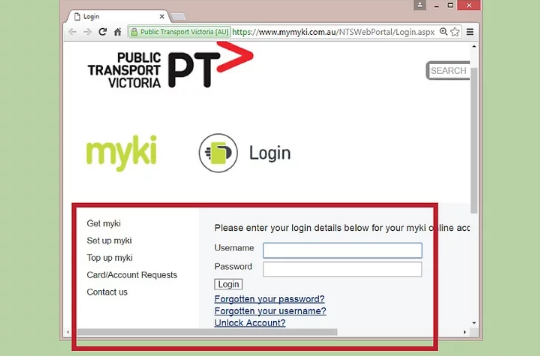
Go to ptv.vic.gov.au or the official myki portal—don’t click on that pop-up ad that promises free travel for life. That’s a scam, and the only thing you’ll get is a virus and a broken heart.
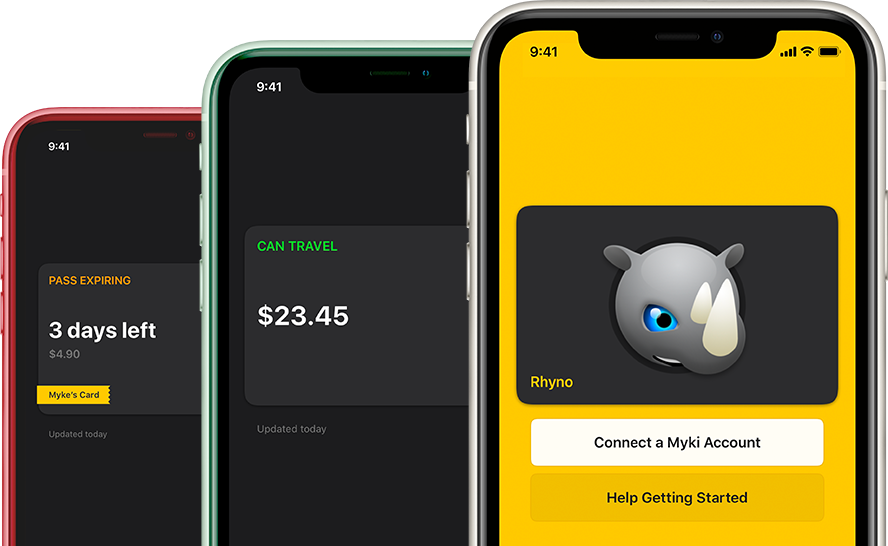
Once you’re on the site, look for the “Myki” section or the “Check Balance” button. It’s usually hiding under a menu like a shy koala. You’ll see a field that asks for your card number—type it in carefully, because your fingers might be clumsy from excitement.
Hit that “Check” or “Submit” button, and voilà! Your balance appears like magic. It’s faster than waiting for a train at 5 AM, which, let’s be real, feels like an eternity.
But Wait, There’s a Fancy Alternative: Register Your Card
Here’s the life-changing move: register your myki on the website. It takes two minutes and saves you from this whole “searching for the number” dance every time. Plus, if you lose your card, you can transfer the balance to a new one—that’s a superhero power.

Once registered, you can log in, see your balance, transaction history, and even set up auto top-up. Auto top-up is like having a tiny fairy that adds money when you’re low, except the fairy charges your credit card. Still, it’s convenient!
And if you’re a glutton for punishment, you can also link multiple cards—so yes, you can track that old myki you swore you threw away.
The “I Lost My Card” Panic Button
Did you just empty your pockets and feel a cold sweat? Relax. When you check online, you can also report a lost card if you registered it. Go to the “Manage” section, click “Lost or Stolen,” and your balance is frozen and transferable. It’s not a thief-proof shield, but it’s better than crying into your latte.

If you didn’t register, well, your balance is gone like a donut at a morning meeting. Sorry to be blunt, but consider this your wake-up call to register, stat.
What About the App? (Spoiler: It’s Pyjama-Friendly)
The PTV mobile app is your best friend for on-the-go checks. Download it, log in (or use “guest” mode for a quick check), and you’ll see your balance in seconds. It’s perfect for when you’re standing at the bus stop and wondering if you can afford a ride or a cheeky chocolate bar.
The app also sends you alerts if your balance drops below a certain amount. Imagine that—your phone gently nudging you like a caring parent: “Hey, you’re almost broke, maybe think about not taking the tram today.”
Just remember to update the app once in a while, or it’ll start crashing and poor you’ll be back to square one, frantically tapping a machine.
And Finally… The Joy of Knowing
Checking your myki balance online is not just about numbers—it’s about peace of mind. It’s about walking onto a train with your head held high, a confident smile, and a wallet that’s not secretly empty. You’ll never have to fake a phone call while pretending to tap a dead reader again.
So go ahead, bookmark that site, register your card, and embrace the digital age. Future-you will be so proud you took five minutes to do this instead of panicking at a station turnstile.
And remember, life is a journey—literally, on public transport—but checking your balance doesn’t have to be a bumpy ride. Stay savvy, stay topped up, and may your myki always be as full as your coffee cup on a Monday morning. Happy travelling! 🚋


![Untitled [dmeist7.tumblr.com]](https://66.media.tumblr.com/19f074627743920cee1a8c0df3b70cd9/tumblr_inline_ofwtztHpXM1r322yr_1280.jpg)