How To Change Crunchyroll To English

So, you’ve finally caved and subscribed to Crunchyroll, the streaming service that’s basically the Louvre of Japanese animation. You’re ready to binge the latest isekai where a guy gets reincarnated as a vending machine, but suddenly a torrent of Japanese dialogue hits your ears. Unless you’re a linguistic prodigy who learned Nihongo from watching subtitled VHS tapes, you’re probably lost—and not in the fun, “wandering through a magical forest” kind of way.
Relax. This isn’t a boss battle with no save points. Changing the language to English is easier than explaining why you cried during a cartoon about a raccoon. Let’s fix this digital hiccup with a few clicks, and soon you’ll be back to hearing overly-dramatic voice actors yell “Senpai!” with perfect clarity.
The Great Hunt: Finding the Settings Icon
First, you need to locate the settings gear, which is the holy grail of all streaming apps. On your TV or console, it’s usually hiding in the top-right corner of the screen, mocking you with its tiny size. On a web browser, it’s right next to your profile picture, basically begging for a click. If you’re on your phone, it’s buried in the “Profile” tab, which is a sneaky move by the developers to test your dedication.
Must Read
Once you’ve found it, click reluctantly. A menu will pop out, looking more complicated than a Gundam’s maintenance manual. Do not panic. We’re looking for the option that says “Audio Language” or sometimes just “Audio.” That’s your ticket out of the subtitled wilderness.
The Golden Choice: English (Or a Weird Hybrid)
Click on “Audio Language” and you’ll be presented with a list that feels like a UN summit. You’ll see Japanese, of course, perhaps Spanish, Portuguese, and then—behold—that beautiful word: English. Select it with the reverence of a knight accepting a sacred sword. In some shows, you might only see “English Dub,” which is the same thing but with a cool-sounding technical name.

Now, here’s a surprising fact: Crunchyroll didn’t always have dubs. Back in the day, they were the purists, and you had to read subtitles or go home. They finally realized that not everyone wants to read 300 words per minute while eating popcorn, so they ramped up their English voice-over game. Today, most new shows get a dub within a few weeks, which is faster than a shonen protagonist powering up.
What If English Isn’t There? The Betrayal
Sometimes you’ll hit a wall: the option is grayed out or just missing. Don’t throw your remote. This just means the show is so cutting-edge that the dub hasn’t been recorded yet—or the voice actors are still recovering from yelling for 24 episodes straight. In that case, you have two choices: learn Japanese in 48 hours, or just watch with subtitles and pretend you’re being “authentic.” I’ve done the latter, and my brain now auto-fills the word “Naruto” with a dramatic whisper.
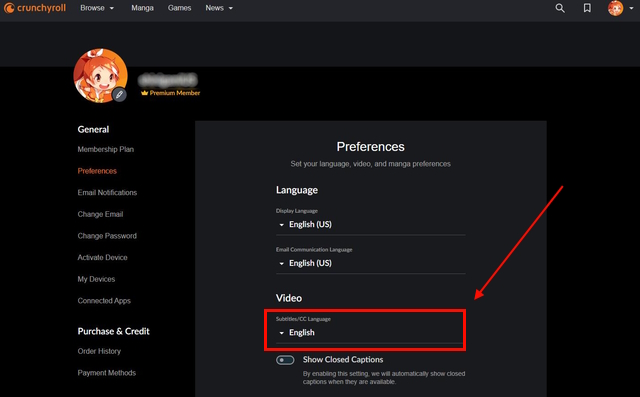
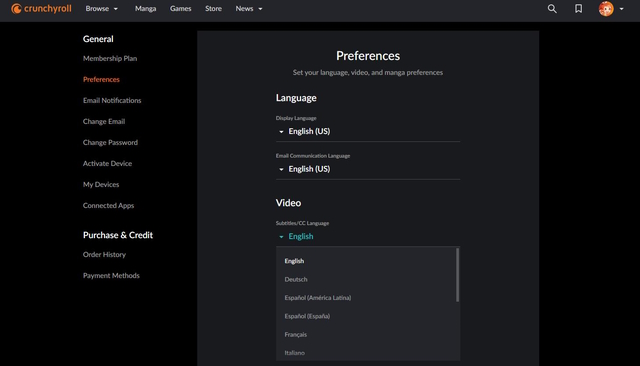
Also, check your account settings on the website. There’s a global default audio setting. Set it to “English” once, and the site will try its best to respect that across all devices. It’s like setting a preference for “no pickles” at your local burger joint—sometimes they mess up, but at least you tried.
Final Log: You’re Ready
After you’ve switched it, press play and brace yourself. The characters will suddenly sound like your friendly neighborhood voice actors, and the giant robots will still explode with glorious sound effects. You’ll feel a surge of power, like you’ve just unlocked a new skill tree in real life.
So go forth, click that setting, and enjoy. And if you ever get lost again, just remember: the journey of a thousand episodes begins with a single click on a tiny gear icon. Now, if you’ll excuse me, I need to go find out which accidentally summoned demon’s voice sounds best yelling at me for not cleaning my room.