How To Cash A Cheque Online Santander

Picture this: it’s a rainy Tuesday, you’ve just found a birthday cheque from your gran tucked inside an old book, and the nearest bank branch is a twenty-minute bus ride away. You could queue up with your damp coat and a sigh, or you could do what modern miracles are made of—cash it from your sofa. Cashing a cheque online with Santander isn’t just convenient; it's the banking equivalent of finding a parking spot right outside the supermarket.
Why bother? Because your time is precious
Let’s be honest, nobody wakes up thinking, “Gee, I hope I spend an hour waiting for a teller today.” Whether it’s a birthday gift, a reimbursement from a friend, or that weird rebate from your insurance, cheques still show up in life like unexpected plot twists. With Santander’s mobile cheque deposit, you’re not just saving a trip—you’re reclaiming that time for a proper coffee, a guilty-pleasure TV show, or simply staring out the window without a care.
First things first: do you have the app?
You’ll need the Santander mobile banking app. If you don’t have it yet, download it from your app store—it’s like adding a superpower to your phone. Make sure you’ve enrolled in online banking and logged in at least once, because the app likes to know you’re a real human, not a rogue robot with a cheque obsession.
Must Read
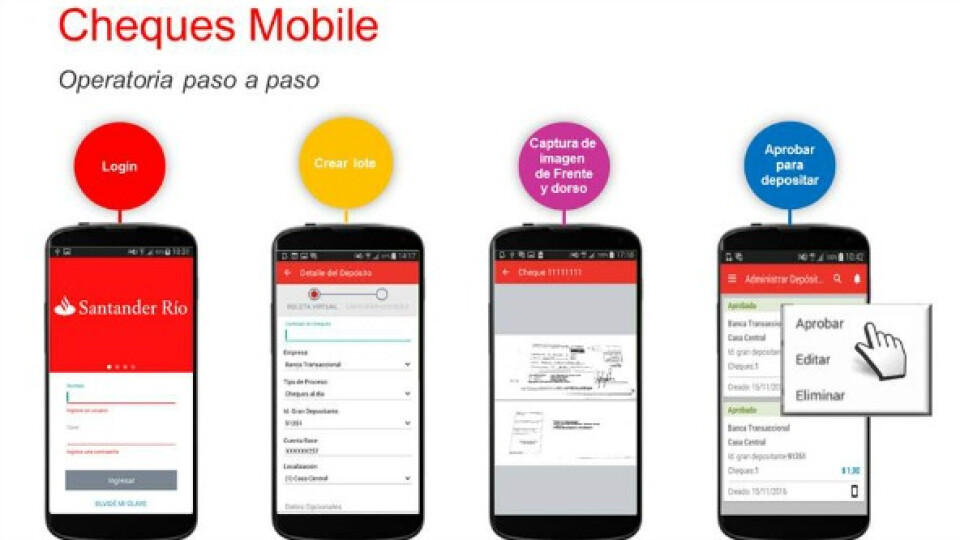
Once you’re in, look for the “Deposit Cheque” or “Mobile Cheque Deposit” option. It’s usually hiding under the “Payments” or “More” menu, like a shy puppy under a sofa. Tap it, and let the magic begin.
The art of the perfect photo
Here’s where it gets a little silly—your phone becomes a professional photographer for paper. The app will ask you to photograph the front and back of the cheque. Find good lighting (a window or your kitchen lamp works) and flat surface. You know that frustrating moment when you try to scan a document and it comes out all shadowy? Avoid it by keeping your hands steady.

Sign the back of the cheque first—just like you would at a bank counter, but with less awkward small talk. Write “For mobile deposit only” underneath your signature for extra safety. Then, snap away. The app will show you a digital “capture area” to fit the cheque inside. It’s like playing a game of Tetris, but you actually win money at the end.
Watch the magic (and the hold)
After you submit, the app will tell you if the cheque is accepted or if it’s throwing a tantrum (usually because the writing is too light or the edges are cut off). Don’t panic—just retake the photo with better lighting. Once accepted, Santander will process it, and funds typically land within 1-2 business days. That’s faster than a loaf of bread going stale.

Here’s a little secret from someone who learned the hard way: keep the physical cheque safe for 30 days. Don’t shred it yet, don’t use it as a bookmark, just tuck it in a drawer. If there’s ever a question, you’ll have the proof. Then, celebrate by checking your balance and doing a tiny happy dance.
The “what if” moments
What if the cheque is for more than your daily limit? No biggie. Santander has a cap (usually around $2,500 per day, but check your settings). If your cheque is bigger, split it—deposit some today, some tomorrow. It’s like eating a giant slice of cake in two sittings; still delicious, just slower.

And if you mess up—say, the photo is blurry or you forgot to sign—the app will simply reject it with a friendly message. You can retry, no judgment. It’s the digital equivalent of a patient cashier who doesn’t roll their eyes when you fumble for your wallet.
So next time a cheque lands in your lap, skip the branch, embrace your inner tech wizard, and deposit it from your couch. Your coffee stays hot, your trousers stay dry, and your bank account says “thank you” in the sweet language of available funds. Now go find that cheque—I bet Gran is wondering if you ever got it.