How Do You Put Songs On Instagram
Okay, let’s be real. You’ve got that one song on repeat, the one that just gets you, and you need the world (or at least your 347 followers) to know it. But the moment you open the Instagram app, you freeze. Where do you even start?
Don’t worry, I’ve been there. Staring at my phone, feeling like a boomer trying to program a VCR. But here’s the thing: putting songs on Instagram isn’t some ancient, mystical art. It’s actually ridiculously easy once you know the secret handshake.
First, The Obvious: Stories and Reels
This is where the magic usually happens. You know, the little squares at the top of your feed that vanish in 24 hours? Yeah, those are your best friends here. And Reels? That’s where you go full director mode with your background music.
Must Read
So, you’re looking at your camera roll. You’ve got a killer photo of your iced coffee or a video of your dog doing something stupidly cute. What’s next? Well, you tap that “Your Story” button or hit the “+” to create a Reel. Simple so far, right?
Adding the Jams to Your Story
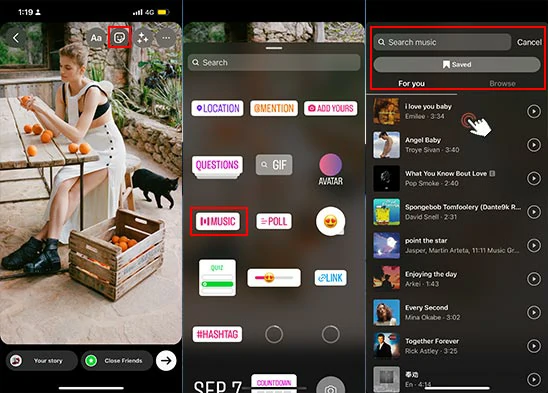
Once your photo or video is up on the screen, look for the little sticker icon. You know, the smiley face with the folded corner? Tap it. Now, scroll down until you see the “Music” sticker. Do NOT skip this step.

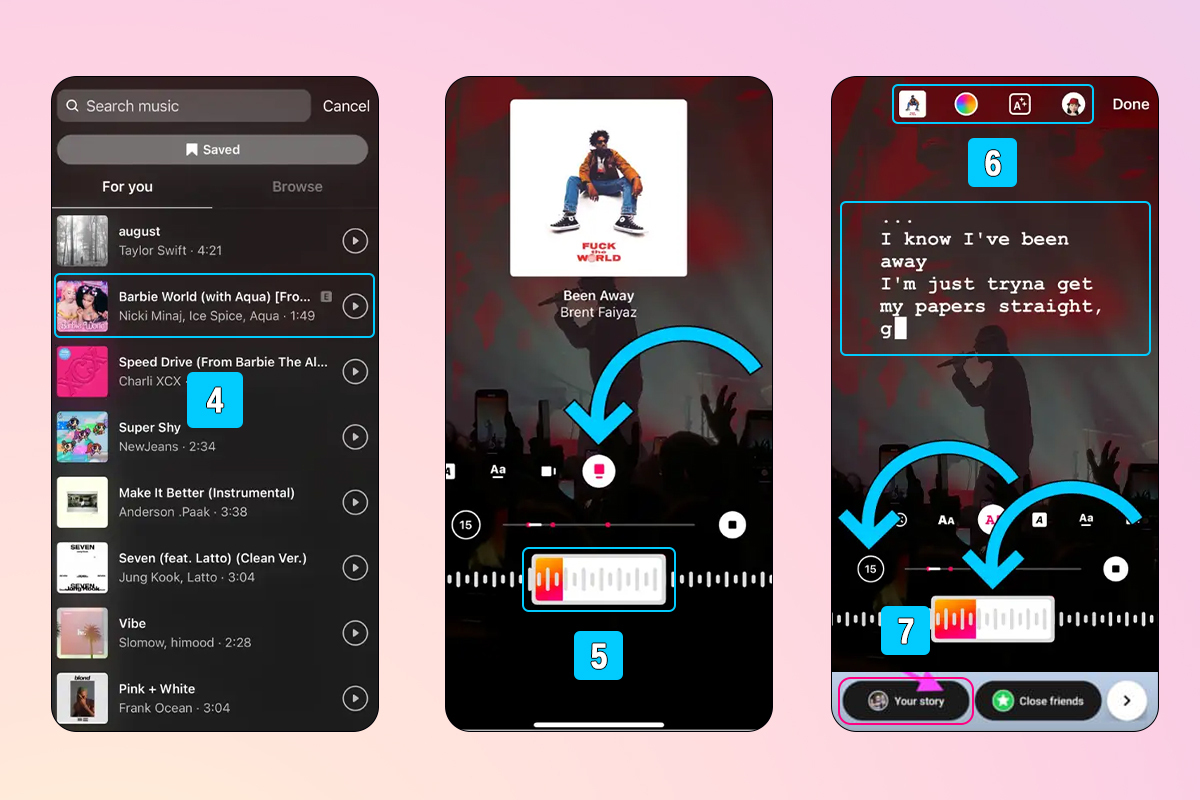
Tap it, and boom. You enter the Instagram music library. This is like a candy store for your ears. You can search for that specific track or browse by mood. Feeling spicy? Type in “dramatic violin.” Feeling sad? There’s a whole category for that.
Pick your jam. You can even choose the exact part of the song you want to feature. Slide that little bar around until it hits the perfect drop. Then, slap it on your photo. You can resize the sticker, change its style, or just shrink it to a tiny little note. It’s your canvas, Picasso.
Rocking Out on Reels
Reels are a slightly different beast, but honestly, they’re easier. You’re in the Reels editor, you’ve got your clips ready. Look at the top of the screen. See that icon that looks like a music note? It’s literally smiling at you, begging you to tap it.

Tap it. The same music library pops up. Find your song. Here’s a pro tip: press the “Add” button next to the song, and then you can adjust the “Volume” in the next screen. You can mix your original audio with the track, or mute your video completely and let the hit single take over. It’s your time to shine, baby.
What About Your Main Feed? (The Grid)
Ah, the classic photo post. The one that lives on your profile forever. Can you add music to that? Yes, you absolutely can. And it’s not as confusing as you’d think.
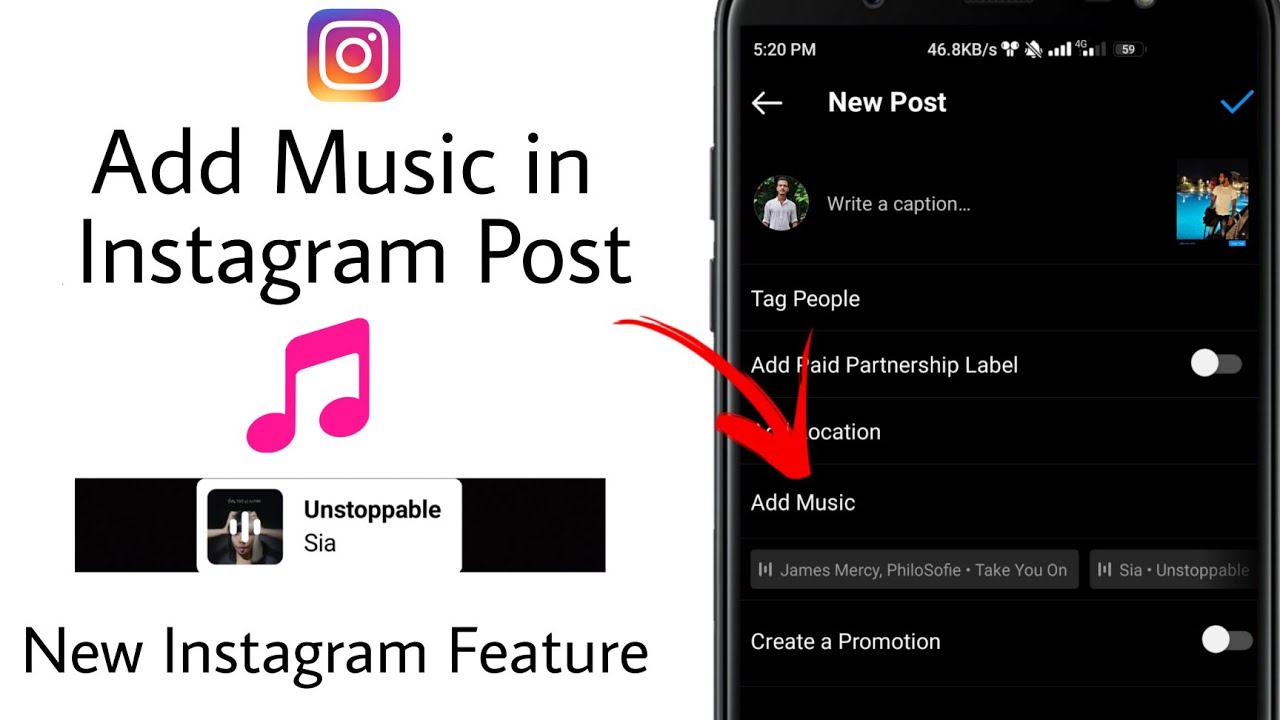
Post your photo or video just like you normally would. You get to that screen where you write your witty caption. Right below the caption box, there’s a bar that says “Add music.” It looks like a little musical note. Tap that! You get the same music library, you pick a track and a 30-second snippet, and that’s it.
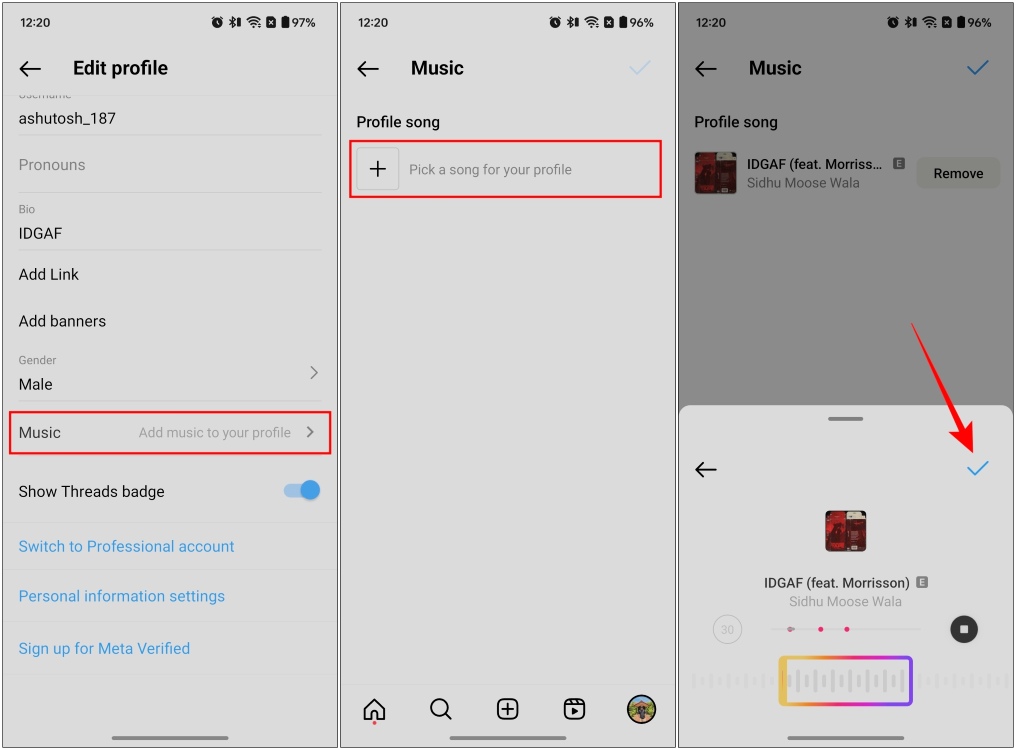
Now, when people swipe through your feed, they’ll hear your song. It adds a whole new level of drama to that photo of your sandwich. “What’s that vibe?” They’ll think. “That must be a REALLY good sandwich.” And they’d be right.
The Secret Trick You’re Missing
Here’s the real kicker. Did you know you can post a song without a photo? Like, just the audio? It’s a glorious loophole for those days when you have zero great photos but a 10/10 playlist.
When you’re on the “Your Story” screen, instead of taking a picture, swipe up on your camera roll and choose the “Create” mode. You’ll see a few options, like “GIF” or “Text.” Pick “Music.” You get a plain, colored background with the lyrics or album art bouncing around. It’s like a little audio postcard. It’s weird, it’s cool, and it makes you look like you’re in the know.
Why Isn't My Song Working?
Hold up. You followed every step, but the song you want is grayed out. Ah, the classic dilemma. This usually means one of two things. First, the artist might not have allowed their music on Instagram. It's their call, sadly. Or, you might be in a country where that specific track isn't licensed. It happens, and it stinks.
Don’t panic. Just search for a cover version or a remix. You’d be surprised at the gold you can find in the depths of that library. Nine times out of ten, a random acoustic cover fits your aesthetic even better than the original. Arguably, it’s a more interesting flex.
So there you have it. No more frustration. No more screaming at your phone. Go forth and soundtrack your life. Your followers are waiting, and honestly, they could use a little more good music in their feed, too.