How Do I Subscribe To Apple Music

So, you’ve decided to finally give in and join the cool kids’ club. That club is called Apple Music, and I’m here to be your slightly sarcastic tour guide.
First, let’s be honest. You probably have a love-hate relationship with your iPhone already. Now you want to pay it monthly for the privilege of streaming songs? Bold move.
But hey, I get it. Spotify feels like a chaotic yard sale, and this feels like a sleek, glassy mall. Let’s just get you inside that mall before you change your mind.
Must Read
Step One: Find the App
Look for the little pink, blue, and purple music note on your home screen. It’s called Music, and it’s been staring at you this whole time.
Yes, that one. The one you’ve accidentally opened while trying to find your flashlight. Tap it, and prepare for a pop-up that demands your soul (or just your Apple ID).
Don’t panic. It’s just asking you to sign in with your existing Apple account. If you don’t have one, go make one, but that’s a whole other therapy session.
Step Two: The “Try It Free” Trap
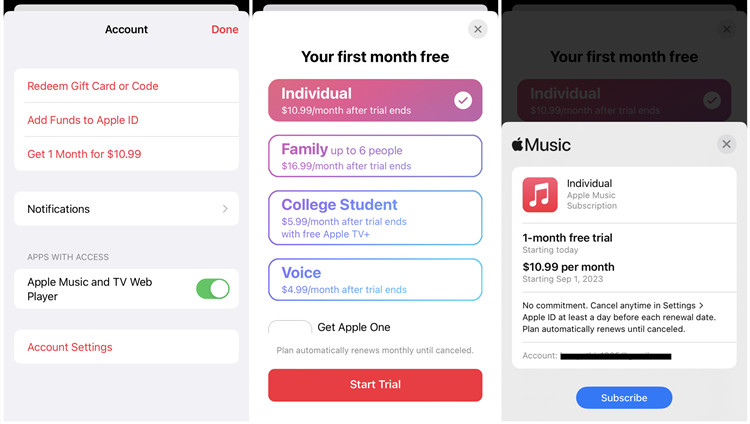
Once you’re in, Apple will shove a banner in your face offering a free trial. It’s usually one month, but sometimes they get generous and give you three.
![How to Play Apple Music on iPhone 12 [Complete Guide]](https://www.tunesolo.com/images/apple-music/try-free-trial-and-subscribe-to-apple-music.png)
This is the sweetest part of the deal, and also the most dangerous. You’ll feel like a genius, downloading every song you’ve ever loved like a digital hoarder.
Just remember: the free month ends, and then the real world hits. Your credit card will feel a tiny pinch, and you’ll suddenly care about your monthly budget.
Step Three: Hit the Subscribe Button
Okay, you’re ready to commit. Scroll down to the bottom of the main screen, or go to your account settings. Look for the big, glowing button that says “Subscribe”.
Tap it. Don’t overthink this. It’s like jumping into a cold pool—the anticipation is worse than the actual plunge.

Apple will ask you to confirm your fingerprint or face. That’s just them being dramatic, like a waiter asking if you’re “sure” about dessert.
Step Four: Choose Your Plan (The Unpopular Opinion)
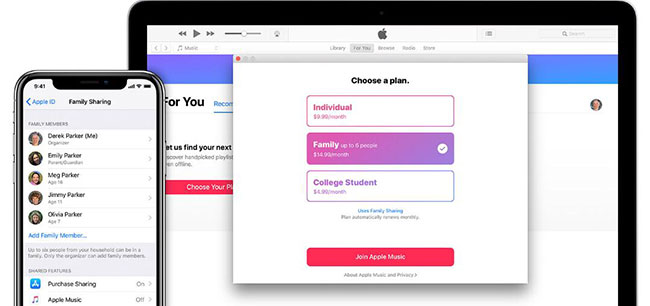
Now, here’s where I might lose you. Apple offers a bunch of plans: individual, family, student, and even a Voice Plan that only works with Siri.
My unpopular opinion? The Voice Plan is absolute garbage. Who wants to talk to their phone just to hear a song? That’s like asking your toaster for relationship advice.
Just go with the Individual plan unless you have a family. It’s simple, it’s $10.99 a month, and it won’t make you talk to yourself in public.
Pro tip: If you’re a student, lie to yourself and sign up for the student discount. Just kidding—actually check with your school email. Save that two bucks for coffee.
Step Five: Press Confirm and Dance
After you pick your plan, you’ll see a screen with a price and a big red button. That’s your final confirmation.

Press it with confidence. Tell yourself this is a “music experience,” not another subscription. Then, immediately download a song called “Money, Money, Money” by ABBA to celebrate.
You’re done! You’ve officially subscribed. The app will now treat you like royalty, offering you playlists and curated mixes that act like they know you better than your mom.
What Happens Next?
You’ll probably spend the first hour just pressing on random album covers. That’s fine. That’s called “exploring,” or as I call it, “avoiding your work emails.”
You’ll also discover that some songs are still grayed out and unavailable. That’s not a bug—that’s just Taylor Swift playing hard to get.
Don’t be upset. You can still download anything you want for offline listening. Just tap the little down arrow and pretend you’re living in the year 2005.
The Final Verdict
See? That wasn’t so painful. You now have access to millions of songs, and you’ll never stare at a blank CD rack again.
Just remember to actually listen to music, or you’ll be paying for nothing like that gym membership you never use. That’s the real trap, my friend.
So go ahead, subscribe, and blast your favorite guilty pleasure. I won’t judge. I’m too busy singing my own sad songs into my AirPods.
Enjoy the beats, and try not to cancel it in a fit of rage when your bill arrives. You’ll be back. They always come back.