Adding Calendar To Google Calendar
Okay, let’s be real for a second. Your calendar is probably a hot mess of sticky notes, half-remembered dates, and that one recurring meeting you swear you’ll cancel next week. But fear not, my friend! We’re about to turn that chaos into a well-oiled, color-coded machine by adding other calendars straight into Google Calendar.
Think of it like this: Google Calendar is the cool, organized friend we all wish we had. And now, you’re about to let that friend take the wheel. It’s easier than explaining why you’re three days late on a birthday gift—and way more useful.
Why Bother? (Besides Avoiding Double-Bookings)
First off, why would you want to add a calendar that isn’t your own? Simple! Because your memory is a sieve, and that’s okay. Adding a shared calendar—like a work schedule, a family dinner plan, or even your favorite sports team’s game days—puts everything in one magical place.
Must Read
No more switching between apps, no more “Wait, what time is that again?” panic. You get a bird’s-eye view of your entire life, and it feels so good to see it all right there. Plus, you’ll look like a productivity wizard to anyone who glances at your screen.
Method 1: The “Copy & Paste” Trick (For Tech-Shy Friends)
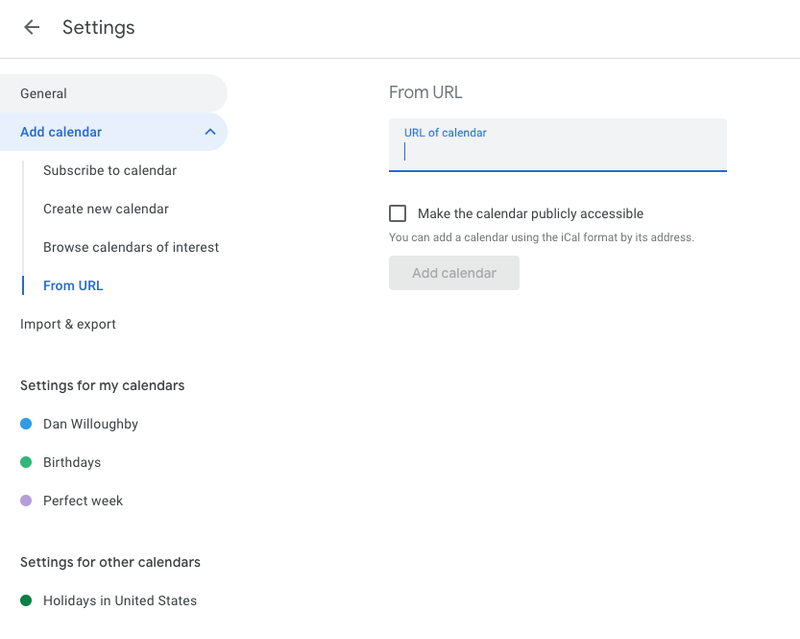
So, someone sent you a link that ends in .ics or .ical. Don’t run away! This is golden. On your computer, open Google Calendar on the web (yes, the actual website, not the app on your phone—trust me, it’s easier).
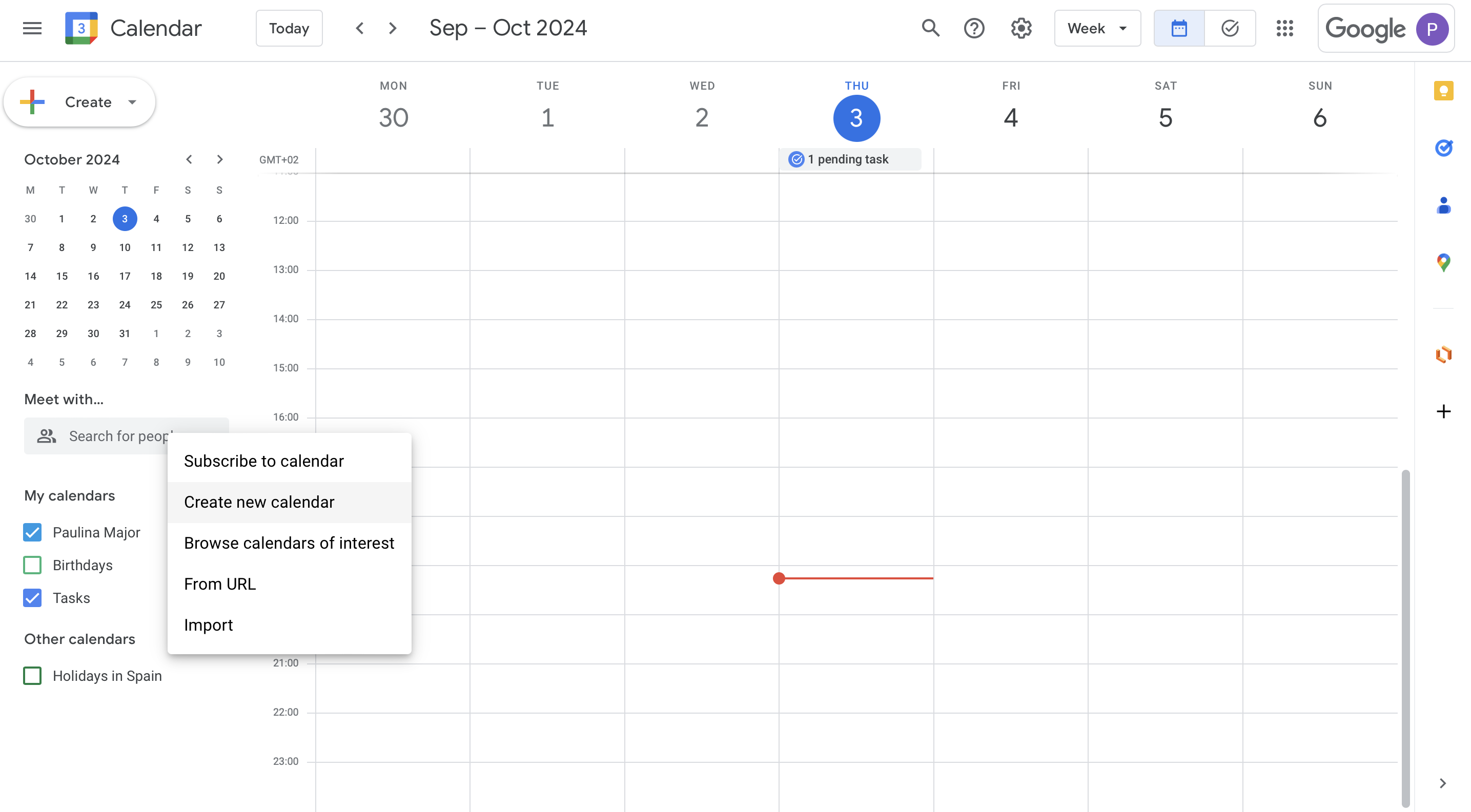
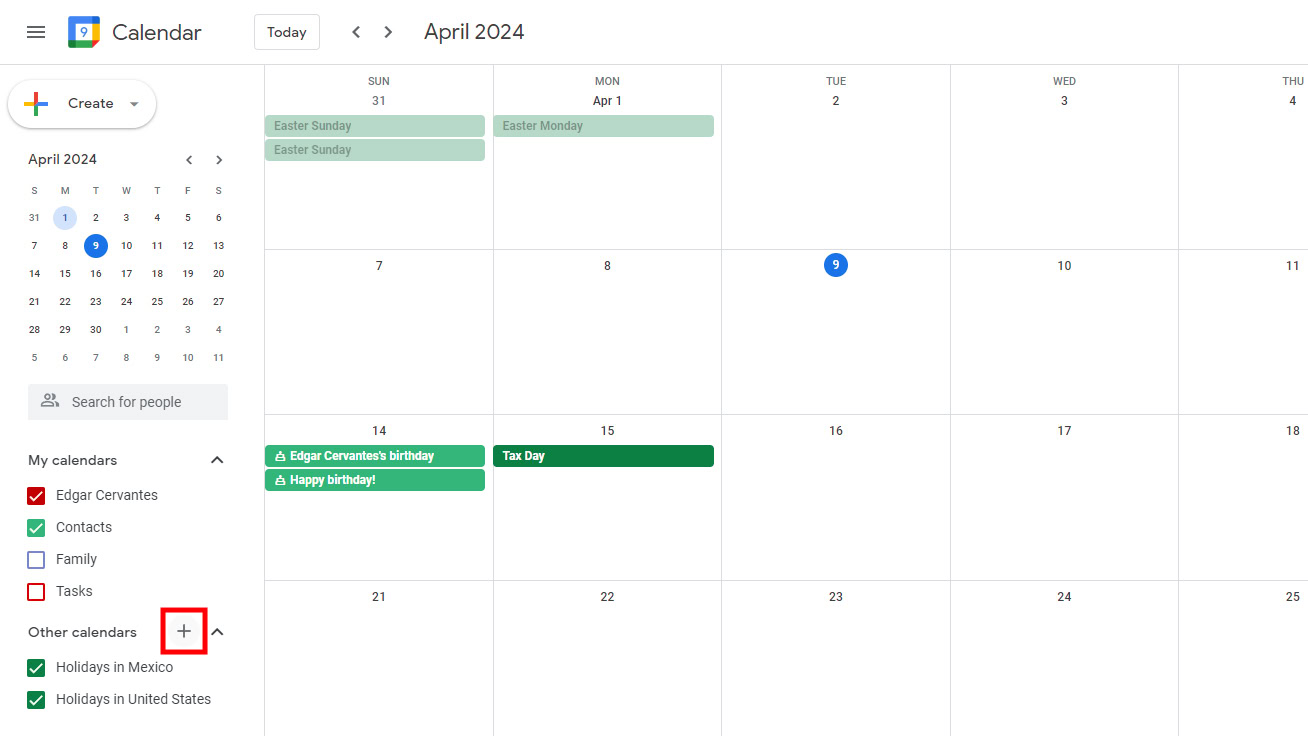
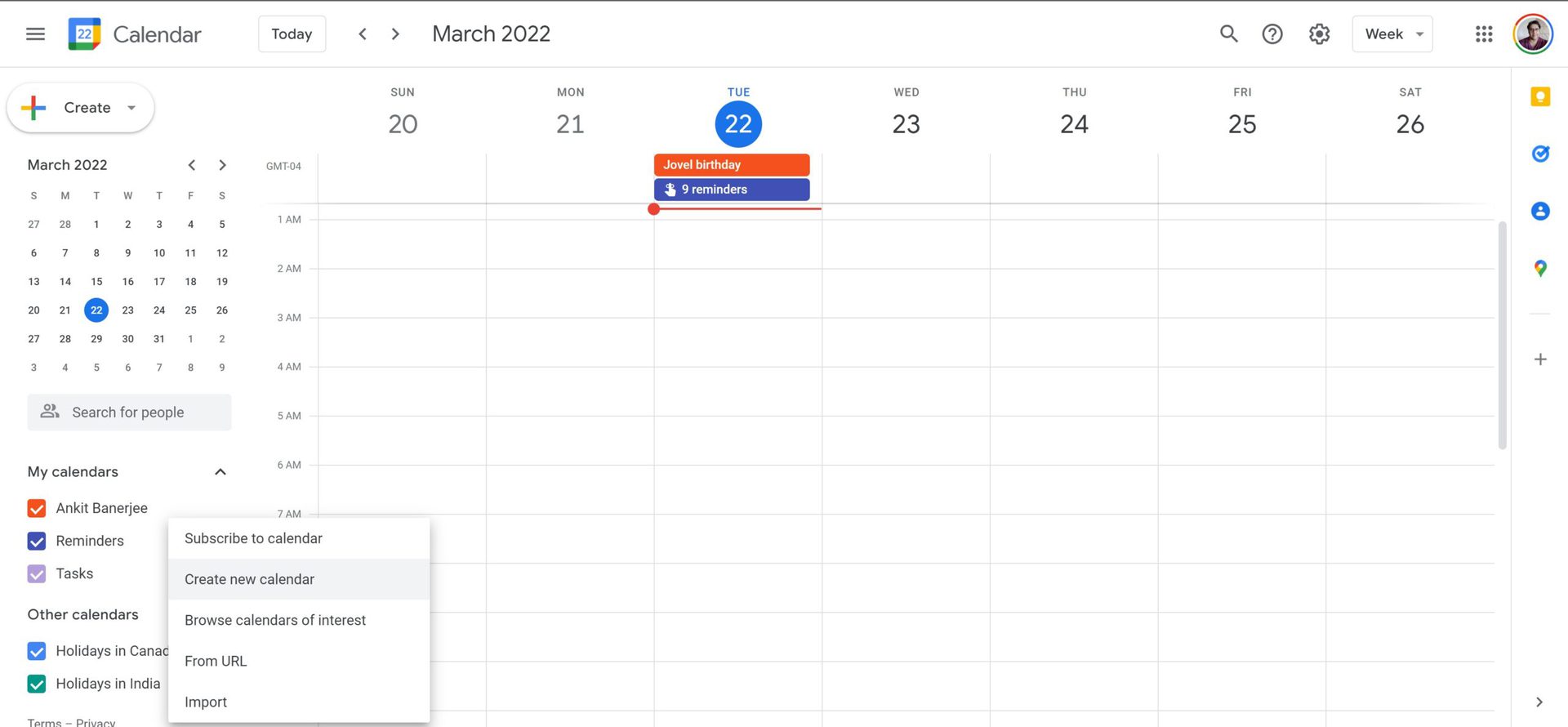
On the left side, look for “Other calendars” and click the little + sign. Then, select “From URL.” Now, paste that weird-looking link, and hit “Add calendar.” Boom! It’s there, like magic. It’ll probably take a minute to load, but then—voilà—you’ve got a new sidekick.
Method 2: The “Subscribe” Superpower
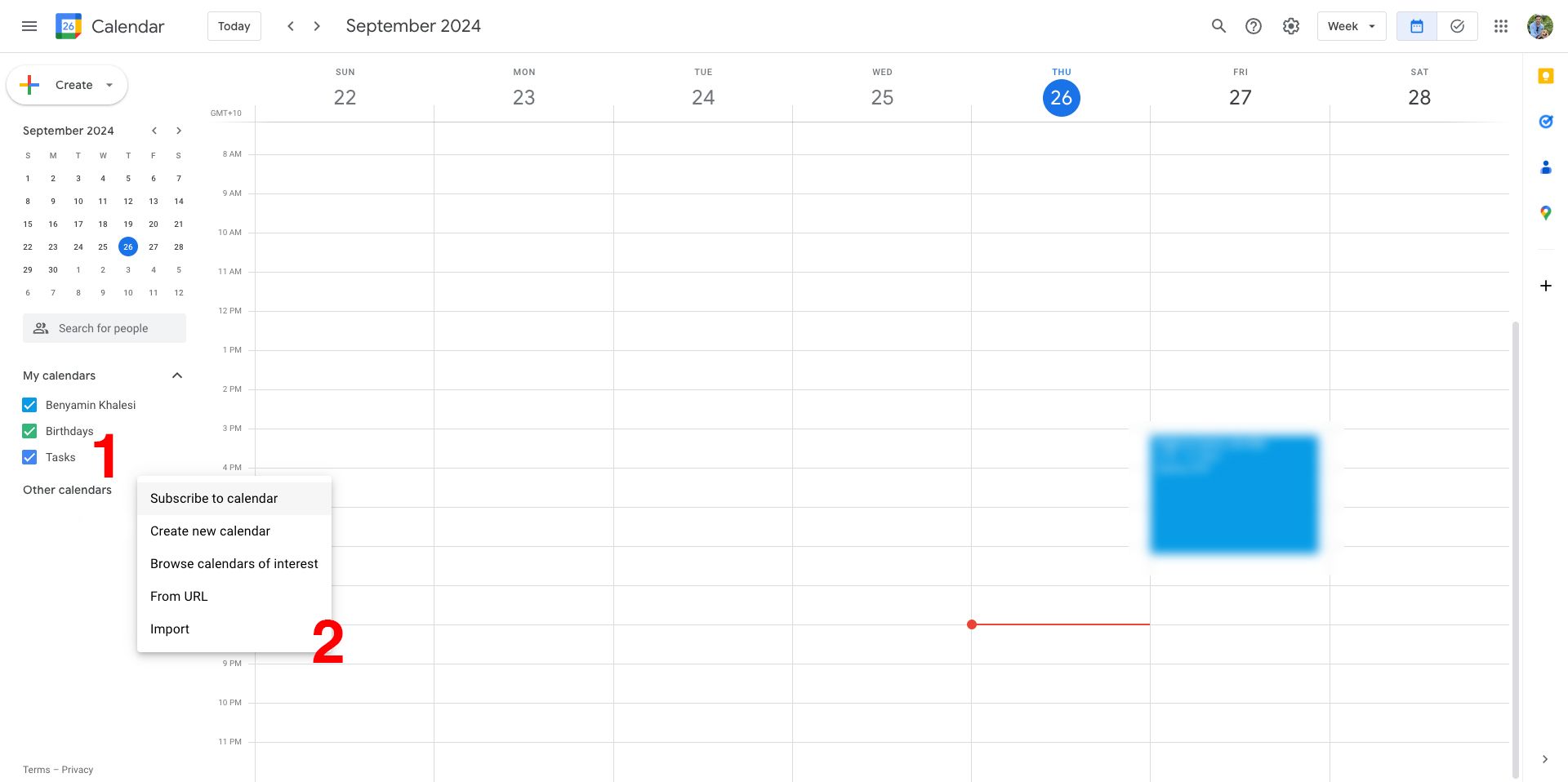
Now, what if you want to follow a public calendar, like a school’s event list or a local club’s meetups? Easy peasy. Head over to your phone or computer, and find the “Explore calendars” button in the “Other calendars” section. It looks like a little compass or a magnifying glass, depending on your mood.

Google will show you a bunch of cool options—from holidays in space to your favorite yoga studio’s class schedule. Click “Subscribe,” and it’ll integrate directly into your main view. I once added a calendar for “National Junk Food Day.” Zero regrets. You can also use the + sign and choose “New calendar” to create your own custom calendar for a side project, like “Secret Dessert Tasting Club.”
What About That Family Calendar? (The Real Hero Move)
Here’s where it gets juicy. Ask your spouse, roommate, or sibling to share their Google Calendar with you. They go to “Settings,” click “Share with specific people,” and type in your email. Then, you’ll get a bright and shiny notification. Accept it, and you’ll see their whole life—from dentist appointments to “Girls’ Night: Do Not Disturb.”
You can even color-code them! Make your daughter’s schedule pink, your work deadlines blue, and your gym time green. It’s like a coloring book for adults, except instead of staying inside the lines, you’re just surviving the week. See? Fun.
Troubleshooting: When It All Goes Wonky
Sometimes, the calendar just doesn’t show up. Don’t panic and don’t throw your laptop out the window. First, refresh the page. If that doesn’t work, check the URL—make sure you didn’t copy an extra space or miss a letter. Also, remember that some calendars are read-only—you can see them, but you can’t edit them. That’s fine! You just don’t want to accidentally move your boss’s meeting to “Nap Time.” Well, maybe you do, but don’t.
If it’s still broken, try switching browsers or clearing your cache. Nine times out of ten, it’s a tiny glitch that just needs a hug. Refresh, wait a bit, and it’ll pop up like a happy little bunny.
Pro Tip: Sync Your Phone So You’re Always In The Know
Don’t stop at your computer! Open the Google Calendar app on your phone, tap that three-line menu, and scroll to “Settings.” Then, add the same accounts or calendars there. Now, you’ll get alerts on the go, which is perfect for when you’re pretending to forget that family dinner you did RSVP to. Your phone becomes your personal assistant, minus the attitude.
You’ve Got This!
Adding a calendar to Google Calendar isn’t rocket science—it’s just a giant, digital sticky note that actually works. You’ll stop double-booking yourself, you’ll never miss another trash day (thanks to that city schedule you just subscribed to), and you’ll feel a weird sense of calm wash over you.
And the best part? You don’t have to be perfect. Your calendar can be a beautiful, chaotic masterpiece of colors and reminders that occasionally remind you of that thing you said you’d do. But now, everything is in one place, and you’re a hero. Go ahead, add that “Emergency Chocolate” event for every Friday at 3 PM. You’ve earned it, and your schedule just got a whole lot brighter. Now, go sync something—I believe in you!